I’ve done a lot of work for nonprofits over the last couple of years, and I’ve come to one conclusion—they’re all different! Just like for-profit companies, they each have their own idiosyncracies and their own reporting requirements. What a surprise, huh.
But there are some things that you’ll see in many nonprofits, and that’s what today’s post is all about. I’ve put together 4 examples, although each example other than the first will also apply to for-profit companies.
One other thing—I’ve used FRx for these examples, but the same things hold true for Management Reporter. The syntax will be a little different in some areas, and since MR is dimension-based, there could be some significant changes there. But the principles remain the same.
So come on along; I’m going to be brief for a change.
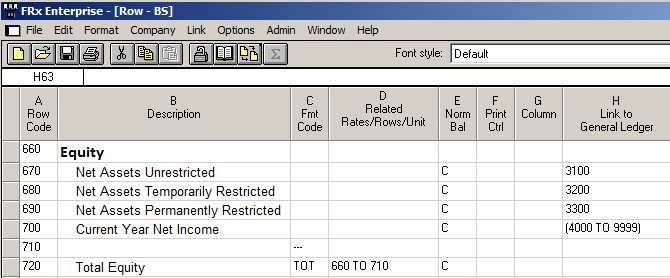
Nonprofit Example 1—Net Assets
Nonprofit Example 2—Detailed Revenue
Nonprofits often need to see extremely detailed revenue at a glance. I always like to see if it’s possible for them to specify the natural account in the row and the rest of the account structure in the tree, then use drilldown capability, but sometimes that just doesn’t cut it and you have to use a more advanced design. That’s what this is.
In this example, there is a 16 digit account structure (6-6-4) with the last 4 representing the natural account.
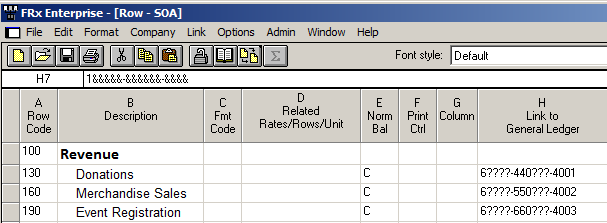
I’m going to specify 15 out of 16 digits in the row format. The first digit of the account structure will be the only thing that changes. Very detailed!
Here’s the 6-6-4 structure as shown in the tree:
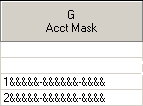
This Account Mask from this tree specifies that there are 16 digits in the account structure. The ampersands (&) tell you that the last 15 digits will be found in the row format.
Let’s presume the first segment is department, and we want all the departments that start with 1, then all the departments that start with 2, and so on.
Sure enough, there are 15 digits in this row format. It specifies digits 2 through 16 of the account structure:
Oh by the way, with some ERP systems you won’t use the hyphens in the row to separate the account segments.
You might wonder what this saves you. Why not just put the entire account structure in the row and ditch the tree? Well, you can do that, but that design is more maintenance-intensive since you’ll have to have a set of “Donations, Merchandise Sales, Event Registration, etc” for department 1, another set for department 2, and so on.
Nonprofit Example 3—Events
I also see the need for detailed event reporting. In this example I’ll show the event code (not the natural account) in the row.
The account structure for this example is Event code-Natural account-Fund.
In order for a segment other than the natural account to work in the row format, you must have a tree that tells the system which segment you’re using:
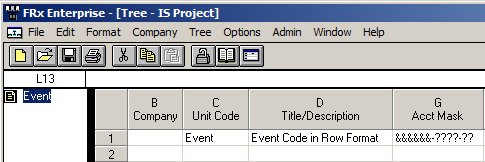
In this case, I have a 3-segment account structure, and I’m telling FRx that it will find the first segment, the event code, is in the row format. This is the only unit in the tree.
And here is the row format with the event codes detailed. This row must be used with the tree above because the tree tells the system that this is the event code segment:
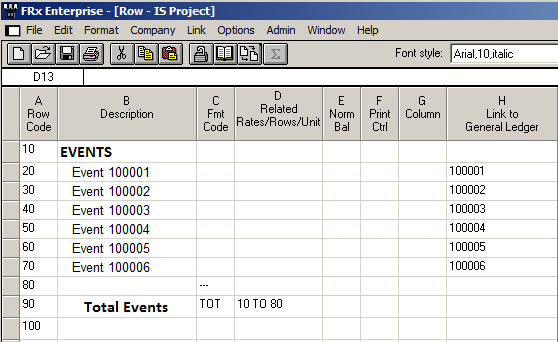
You might be wondering where the natural accounts are: they’re in the column layout, in the account filter cell.
Nonprofit Example 4—Grant Reporting
Last but not least, lots of nonprofits need to be able to report revenue and expenses month by month for the last 5 or 6 years. You can do that with ‘BASE-#’ in the column layout:
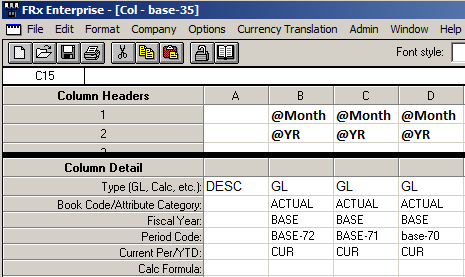
This column layout specifies current period activity for the base period (the report date in the catalog) less 72 months, then less 71 months, and so on.
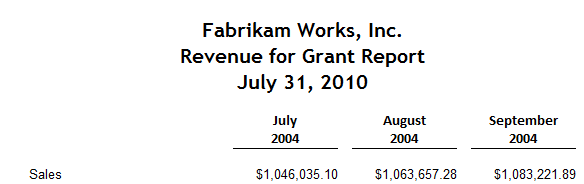
This is the resulting report run for July 2010, giving results starting in July 6 years ago:
So there you have a handful of nonprofit examples. Hope this helps. Cheers—Jan
Jan,
In your experience do NFP’s most often create an account segment, use Grant Management with Analytical Accounting, or just use Analytical accounting for things like events, funds, programs, etc.
Hi Gloria! The nonprofits I’ve worked for have a variety of ERPs, not necessarily GP. So most of the time they are just using a segment or two of the account structure for tracking events, funds, etc. (Even when it’s GP!) Jan
We are working with Frx and Datatel Colleague. We have net asset classifications that we are trying to place in columns on the Statement of Activities. Unfortunately sometimes the same fund can have unrestrictecd and temporarily restricted net assets. Colleague has an asset tag that we would to use. We were trying to use it in the Attribute filter with no luck.
Can you help?
Hi David…I’ve worked with several Datatel systems but I’m not sure you’ll have much luck with this. But you are definitely looking in the right place with the Attributes; that’s the first thing I would try. There are several “T-codes” available in the column layout (under column type) as well that could conceivably be a possibility, so it’s maybe worth a shot. Good luck. Jan
Hi Jan,
You may have already answered this above (and I missed it). I’m working with a non-profit that is using natural accounts of two different lengths (5 digits and 7 digits) – and I’m not sure how to hook them back to the tree (since the hook tells the tree how many digits to look for). Does this make any sense?
Hi Jaenne/Jeanne…yes I know exactly what you mean. Whether FRx or MR, the answer is that you need to add a second link to GL (or FD) in the row definition. You’ll have to use a tree with this design. You will use the row link column in the tree to tell the system which one of the links to use. And the application reads the account structure of whatever company is listed for that row, so you’ll end up with the correct number of digits for whichever company is specified. Sort of hard to describe, but I did a post several years ago that has a picture of how this works. It’s not exactly your situation; yours is actually easier than what this post describes. How to use the full account structure. Good luck…Jan