Putting the full account number in the row overrides the tree. Are you toast? No.
Most of the time, FRx is used with the main GL account segment specified in the row, and the remaining parts of the account structure are specified in the optional reporting tree. Often, however, there is a need to specify the full account structure in a row or two (I’m using a headcount example today), and this causes inaccuracies.
You should be very aware that anytime there is a full account number in the row and you’re using a tree, it overrides the tree, resulting in duplications. So if you’re using 4500-????-??? in the row, you get all the 4500’s for every department in the company. If 4500-????-??? totals $8,000 and there are 10 units in the tree, your summary total is going to be $80,000. You will get the full $8,000 in each reporting unit. It’s overstated 10 times. Not so good.
So what to do? Sometimes you just have to use the row without a tree.
Or you may have a situation in which you may be able to use the following technique. In this example we’re dividing the headcount in one department by the headcount for the whole company to determine a percentage (usually used for allocations).
Here’s the row. The way you set this up without duplication is to set up a second Link to GL column. Your detail units will use the original link in Column H (called GL1 in the tree below), and your top level summary unit will use the second link in Column I (GL2 in the tree below). The ‘XR’ in the Print Control column tells FRx to suppress the rollup to the summary level.
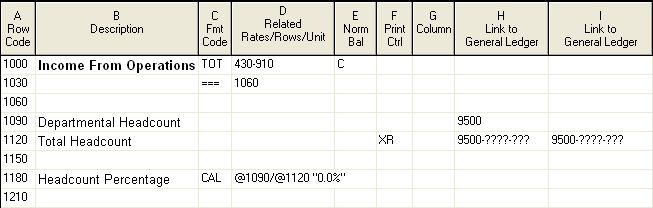
In the catalog, make sure you check the box ‘Use row formats and worksheet links from reporting tree’:

In the tree, your top level summary unit uses the second link (GL2). Your detail units use GL1. Column G, Acct Mask, is a bit unusual too, in that an account mask is specified for the summary unit. Any time you have a unit that’s pulling from the GL, it must have an account mask.
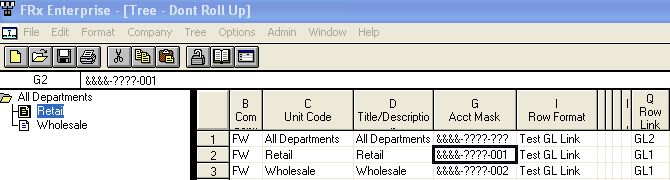
A bit more explanation on the row: Departmental Headcount account 9500 is going to rollup to the All Departments unit, just like normal. We don’t want Total Headcount to rollup, however, since it would overstate. It is NOT going to rollup due to the XR suppress rollup code. Instead, the summary unit gets its data for Total Headcount from the 9500-????-??? in the GL2 link.
If you have any situations like this, I’d suggest you experiment a bit to see what you can work out. This is admittedly not exactly elementary FRx. You can test with just a few reporting units, and when you think you have it, make sure your ‘All Departments’ unit ties back to current year income, then make sure your individual departments foot to ‘All Departments’. If there are too many to foot manually, export to Excel and tie out there, another good use of Excel with FRx. Good luck.
I’m trying use the full account code on a row, but I need to grab data across companies. FRx seems to only grab balances for the account codes I specify within the company currently being reported on and does not include balances for other companies on this row. We have the same account mask, etc across companies and I do not have any difficulties when using a tree with multiple companies. Any thoughts?
You’re headed the right way using the tree. It’s what you need to grab data across companies.
Another application for this that I thought I’d share.
I have a client that uses the # of Weeks per Month in their metrics. Things like Units per week, Hours per week, etc. The actual number of weeks in each month not calculated, rather it is posted to a unit account each month.
The challenge we had was to get this account on each departmental report via a tree, but to somehow avoid showing the rollup sum on the consolidated report. We kept getting weird things like 340 weeks in January – not good.
I tried the suppress rollup setting on the row, but this completely eliminated it from the consolidated reports. So I ended up using a departmental counter as follows.
I created another unit account called Departmental Counter, and posted a 1 to it. Then on the row format, I listed the #weeks account and the dept counter as NP rows. I then have a calc row that divides the #weeks by the counter.
On each departmental report, the #weeks is always dividing by 1. On the consolidated reports both the #weeks and the counter roll up, then divide to get an accurate number of weeks.
Example
January has 5 weeks. There are 3 departments.
Each departmental report will divide 5/1 to show 5 weeks in the month. The consolidated report will roll up to show 15 weeks and 3 departments. It will then show 15/3 = 5 weeks.
One other trick: any YTD columns will throw the departmental counter out of whack. So I used a row modifier to force that row to always use the first period.
Thank you Chris…you always have great things to share!