Management Reporter 2012 has just been released. Here’s the latest scoop from Convergence in Houston a couple weeks ago.
Off the bat, here are the ERPs it works with: AX2012, AX2009, GP2010, SL2011, and NAV2009.
One of the biggest changes involves this formatting of account numbers (that just about everyone has complained about):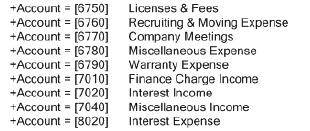 You now have the option to turn the ‘+Account =’ description on or off on a user-by-user basis.
Features from FRx that have been added:
- Missing Account Analysis—this sort of equates to Exception Reporting in FRx, although implemented in a different way.
- Headers for rolling forecasts—I create lots of Forecast reports (actual through current period, then Budget for future periods), and spent some time early on trying to figure out why I couldn’t get Base+1 to work in a column header in MR. Turns out it wasn’t there. But it is now.
One of the biggest additions is Drillback capability:
- Drill back works for all 4 ERPs for either account or budget
- Drill to Dynamics icon: opens voucher transaction screen on a transaction
- Drill back in budgets to budget register
- For instance, view the Detail Inquiry screen on an account level drill—all the way back to the source document Receivable Transaction Inquiry zoom (in GP for this example)
For AX2012:
- AX organizational hierarchies are available for use in MR. A newly published organizational hierarchy appears in MR, and you can use either it or a reporting tree. The system picks a hierarchy based on the report date. You can also use a hierarchy as starting point—save it as a reporting tree and edit it.
- Manage all users from inside AX (same for NAV2009).
- Architecture change—Datamart is available (same for NAV2009). I posted some AX and NAV datamart information a couple weeks ago.
Report Distribution:
- Publish to Sharepoint or a network share
- Email reports via Sharepoint alerts
- Email a link to a report from within Report Viewer
- Generate to multiple Report Library locations like Library/Finance, /Operations, /Sales and Related Report Link Locations for network shares
- Schedule either an individual report or a report group
- On a Sharepoint site, there are 3 options for opening a report—the Report Viewer, Excel, and XPS
- If you have the licenses for it, I’d recommend installing the Report Viewer for the optimum drilldown experience
Performance:
- Performance enhancements across the board on the engine
- Calculated rows are considerably faster
Here’s what else is new:
- Company integration: import companies instead of creating them manually (everyone but the datamart implementations)
- Personalized & secure view of data in all output types (Viewer, Excel, XPS)
- Attach comments to important rows
- Chart a single row (or selected rows & columns)
- Instant Messenger icon on toolbar—launch IM client from within a report
- Page within a report with paging icons on the lower right
- Jump to key areas of a report with GoTo section at lower left
- An enhanced toolbar—it has an Export to Excel icon!
- Find a key value in a report such as an account description
Other:
- You do need a viewer license for the Report Viewer
- NP rows do print in excel
- Row linking—see April Olson’s blog post on using excel to report off other reports for an alternative to row linking
- Migrating from FRx—currently you must go to MR v2 first, then to MR 2012
- Side by side installations of MR v2 and MR 2012 do work
- Licensing is different from FRx—named users instead of concurrent users
- Status quo: a Forecaster integration tool pushes Forecaster budget data into the ERP
My personal MR wishlist:
- Effective Dates—My AX clients sort of can’t believe there isn’t QTD reporting. If there’s not any, and it’s not in the works, then at the very least give us effective dates.
- View Subtotals—this is essential for fixing out of balance reports despite the existence of missing account analysis.
- Page Layout—I’m fighting page layout on every report…and dying for Excel-style Page Setup capabilities.
- Myriad bug fixes—although some of the items I’ve complained about have been fixed in MR 2012.
- Performance—long term, I believe data mart architecture is going to be it, and it sounds like this may be the way they are heading across all ERPs.
Lots of great information was dispersed in Houston—thanks to the CPM team. Cheers—Jan
Great summary Jan!
Hi Jan: I think this is a good collection of what is to come in MMR 2012.
Hopefully, in the near furure, ther’ll be a corresponding collection of good ‘How-Tos’.
Thanks for your contributions.
Regards,
Thanks David, and yes, How-To’s are coming!
Thank you Les!
Hi Jan
I was kind of hoping that the conditional print controls in the column formats would be fixed with this release but can’t see that they have. Are you finding the same thing?
Cheers
Heather
Hi Heather…they seem to be working, but I haven’t had any trouble with them in the old version either. Cheers—Jan
I just compared jobs in MR vs and MR2012. In FRx and Management Reporter (prior to MR2012), GL Accounts with a normal credit balance would appear as a positive number if column F (Normal Balance) is populated with a “C” character for those rows. In MR2012, these rows now appear as a negative number. Is this intended?
Hi Joe…I haven’t seen this at all; signs are getting flipped due to C in Normal Balance column. Must be something else going on, probably something in the column. Cheers—Jan
Hi Jan,
Just wanted to inquire if in MR 2012. Is there a possibility to assign a static value on a row or column definition and then use that value on a calculation? i.e. fixed rates, etc. Is this possible in MR 2012? I see there is an option to link an Excel and pull information there but seems to be a lot of work if i just need to specify a single value not pulled from the ERP into my report. Appreciate any info you can share.
Thank you.
Hi Jan, sorry i am asking again.
Is there a way to define in the column layout to print only transactions for a specific day and use that column to print for multiple periods/months. I see a start date/end date but if using that, i believe u set a specific date. I just need it to print for a specific day i.e. 1st, 30th, etc. and use it for multiple months.
Thank you
Hi Jeff…re the static value, you can use a CAL in column c in the row, then the value in column d. Anytime you don’t precede a CAL value with an ‘@’, MR, and FRx too for that matter, will think it’s a number and not a row code.
Re the specific day, you’re on the right track with ‘Start Date’ and ‘End Date’ in the column. Thankfully you don’t have to set it to month/day/year. You can set each to a single day and it will generate for that day for whatever the reporting period is in the catalog. So you don’t have to keep coming back in to hard code the month. Sweet. Enjoy.
Hi Jan,
I will try these out. Thanks very much.
Cheers:)
Hi Jan,
I wanted to inquire if in MR, do you know if it can support multiple sources? May be a GP instance and AX instance in one MR console? Have you seen this kind of setup before?
Single report from two sources basically? – if this is even possible. I am thinking at you can have the same report copy but each copy should exist in each configuration. Appreciate any inputs you may have. Thank you!
Hi Edward…yes. I’d point you to the configuration console where you tell MR that you want to configure both GP and AX. Then once that’s done, you’ll import companies. To answer the report question, both companies can point to a single building block group (if you want) where a single copy of the report can be maintained. There’s lots of info in the installation guide and in the data integration guide. Cheers! Jan
Hi Jan,
I am trying to work on Organisation heirarchies in AX2012, so that they can be integrated with MR and used at the place of Reporting Trees. I want the financial dimension values (custom dimensions created as per a company’s requirement) to appear in the heirarchy. I am not able to find how to attach these dimension values to the tree so that they appear in MR. Could you please suggest?
Hi Chandrakant…for work inside AX you should probably contact microsoft or your partner directly. The AX organizational hierarchy should show up automatically in MR, then you can use in place of a reporting tree (just as you’re expecting). Sorry I couldn’t be of more help! Jan
Hi Jan,
Thanks for your response. I will work on it.
Hi Jan,
Do you know if effective dates has become an available option in MR? We are currently using FRx and would hate to lose this feature in our upgrade to MR.
Thanks!
Hi Beth…as far as I know, it’s still not there. Microsoft has recently released Cumulative Update 7, but I haven’t been able to install it yet, so I guess it could conceivably be there. But guessing it’s not. I agree with you and have been asking for this for years! Meanwhile, you can create 4 different report definitions and pick the one for the quarter you’re running, or stick them in a report group. It might also be possible to redesign the report to pick up the current month and the last 2 months to give a quarter end report; that way you wouldn’t have to hard code any period numbers and you could use just one report definition. Just depends on what you need. Food for thought. Cheers…Jan