Viewing an FRx report in Outlook—but without email
What’s the 1st thing you do at work every day? Even before coffee, it might be open Outlook to view email. You might be very interested in seeing a daily cash & equivalents balance, for instance, from within Outlook and without opening FRx.
I’ll explain how to view an FRx report from within Outlook, like this:
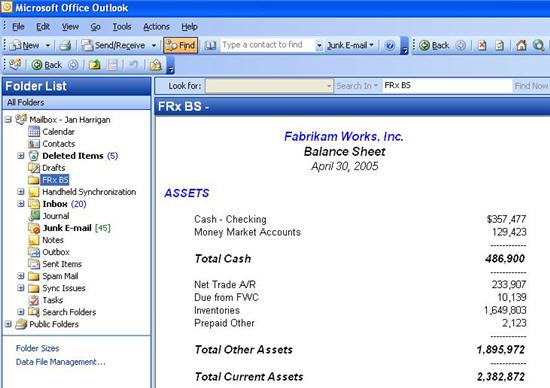
Overview: first we’re going to choose a report in FRx, generate it in an HTML format, then use a new folder in Outlook to point to and view the report. Here are detailed instructions.
First, in FRx:
- Choose a report. (Might want to clone it to create a new catalog.)
- Change the output to HTML.
- Be sure the check the ‘Worksheet options’ boxes (in the lower right hand corner) for ‘Print headings’, ‘Print format rows’, and ‘Print underscore rows’.
- Drop down the ‘File name’ box and note the location of the file.
- Generate the report for an appropriate period.
Now move to Outlook:
- Left click the Mailbox folder, then navigate to File>New>Folder, and you get the Create New Folder dialog:
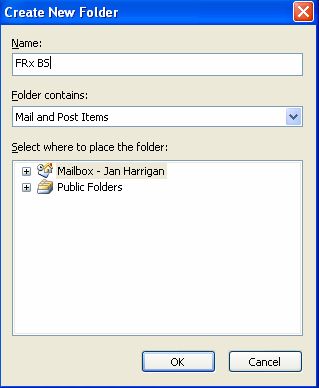
- Give the folder an appropriate name (I’ve used FRx BS in this case(!)), let it default to Mail and Post Items, and click OK.
- Back in Outlook, right click on the resulting folder and go to Properties.
- Click the Home Page tab, click Browse, and navigate to the location of the .HTM file you just created in FRx, select the file, then click ‘Show home page by default for this folder’:
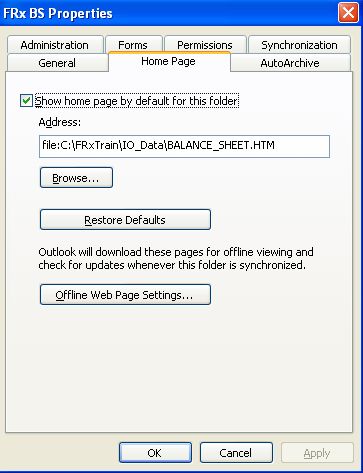
- You may get an annoying message along the lines of ‘could not obtain offline settings’. Just ignore it, click OK, then you may need to actually click Cancel to get out (!), but don’t worry the report is already there.
- You’re done.
Generate the report in FRx to refresh daily, weekly, or monthly as needed. If you have the FRx Report Server installed, this can be automated.
I tested this using Outlook 2003 on an exchange server and FRx 6.7.
This is a hero-maker!
Jan –
You may not remember me, we met at the ICN meeting during Convergence 08 in Orlando. I enjoyed meeting you, and you blog. Great stuff.
This Outlook one hit a chord with me because I’ve used it with a few clients. I refer to is as “the poor man’s dashboard”. It works really great.
I’ve got one client that has even taken this one step further. Start by creating several FRx reports in HTML; chain them together if you want. Now create a Word or Excel document with links to those reports. Save this document as HTML and use it for the home page in the Outlook folder. This way you get one page with links to all the reports.
Give it a try and let me know how it works for you.
Chris Mast
Hi Chris,
Of course I remember you: how could anyone forget your Rocky Horror performance at Howl at the Moon?
This is a GREAT idea; very creative. I love these kinds of simple practical ideas that don’t cost much at all!
Thanks for sharing. Jan
Hi Jan,
This is an excellent idea to have it in outlook. What would be the sender account in case of CITRIX environment.
Thanks
Ragu
Just curious – have never heard of anyone having runtimes as long as ours on a full load – we keep approximatley 1 year of data online; run times start off approximatley 6 hours and usually end up at more than 16 hours nearer the end of the year – we are on an older release and plans are to upgrade in 2010, but just wondering if anyone has experienced run times such as these – we’ve been on FRx since 2003 and had so much trouble with it to begin with, we are fearful of updating – we are on 6.5 running package .194…server is 3.0 mhz with 4gb of ram.
I really like your site and want to update frx in order to take advantage of some of the opportunities within outlook.
Thanks for your feedback!
Frank