This is the first of a series of posts on how to simplify FRx.
It’s so easy to make FRx harder than it should be. And it’s not only harder to set up but way tougher to maintain.
In this post I’ll give some real world examples of simplifying FRx totals and calculations. I’m using Before and After screenshots, so these are very practical examples. Without further ado, let’s dive in!
Simplifying FRx Totals
This first example is a balance sheet from the FRx Demos. Yes, even it can be simplified. The original is on the left and my simplified version is on the right. I couldn’t resist getting rid of that dreadful blue (and the italics), but other than that, two formulas are all I changed.
Here’s what I simplified: my TOT formulas include other TOT formulas in their range. This is not a very well known point, but by design TOTs ignore other TOTs. So that means your formula can be just one long range and you don’t have to worry about picking the subtotal row codes one by one. Granted, there’s not a huge benefit in this particular example, but this is a nice timesaver if you’ve got a long row format. I use it every day.
Faster, simpler, easier.
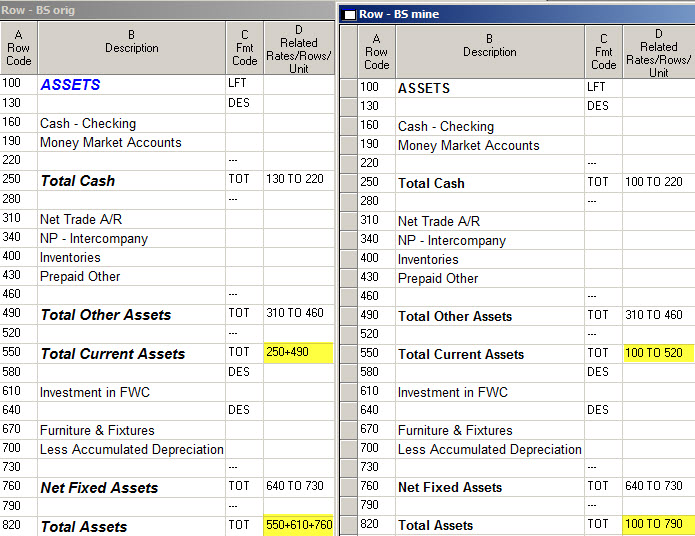
When to be careful? Well, if you’ve got a CAL in the middle of the range, the TOT definitely will pick that up.
Be careful on a P&L too. It’s likely that you’re flipping signs in column E Normal Balance, and TOTs and CALs work with a row after it has had its sign flipped. So if your range includes both C sign flipped rows and normal balance rows, you shouldn’t use a TOT range including both types. For example, if you’ve got sign-flipped revenues and normal balance cost of goods, then you wouldn’t want to use a TOT to pull in the entire range for gross profit. Instead, the TOT formula should be revenue minus cost of goods. Easy enough.
Simplifying FRx Calculations
This next example shows the user jumping through a lot of hoops to get to a total row: first a nonprinting TOT row, then a CAL calculation row based on the totals, then another CAL row based on the first CAL. (And the formulas go way off the page!)
It hurts my head just looking at it—and I do this every day. Can you imagine a new staff person trying to follow this logic?
As it turned out, all that was needed was just a very simple, very easy TOT row.
BTW, the technique used in rows 1063 and 1065 is called ‘column placement’. Sometimes you need to, but don’t do it if you don’t have to!

Here is another FRx calculation simplification. The user in the Before shot is dividing gross profit by a sales subtotal (that’s also being calculated in the formula), and placing the results in columns B and C (more column placement). My tipoff that this could be simplified was that the formulas are the same except for the column letters (B and C).

In the After example, I added a single row to subtotal sales, and decided to use an alpha row code SALES because it makes calculation formulas easier to read. I used the @ sign preceding the row code: this tells FRx to put this calculation in every column.

So there you have it—a few Before and After simplifications. As you can tell, the Afters are so much easier to deal with! There are so many ways to get downtown in FRx. These Befores did give valid answers, but at what price? I think the moral of the story is to ask yourself if there’s an easier way. I hear all the time from people who just instinctively know that “there’s got to be a better way!”
PS. Oh! One more thing I see is using CAL formulas (instead of TOT) to do a simple add or subtract. It’s way simpler to just use a TOT.
I have a column layout that uses:
sept2010, %of sales, sept2009, %of sales.
How can I get %of Sales for 2009 use the Baserow (Sales) for 2010?
Thank you
Hi Jan! Great site! Is there a way to perform different calculations in the same column? For example I would like to show average employees for the quarter in the same column as quarterly sales totals.
Hi Jerry…I think that instead of dividing column D by BASE, you’ll probably have to divide by B200 (if B is the column for 2010 actuals and 200 is the row code for sales). Jan
Thanks Loa! Yes definitely. Do a search (on this site) for calculations and also for headcount. You might also take a look in Help for CAL or calculations. The CAL format code in the row allows you to multiply and divide. Jan
Hi,
I wonder if someone can help me with the calculation.
If i need one row shows
= the balance of one ledger account plus a constant value (let’s say, +100 )
How I can create that formula?
Thank you a lot if you can help :)
Sure. You’ll have the GL link to your one ledger account in column H. Let’s say it’s on Row 230 (column A in the row format). On a second row, usually one row down, you’ll enter a CAL calculation formula as “@230 +100”. You’ll probably want to make row 230 NP nonprinting. Cheers—Jan
How can you divide by the row code “sales” in a column formula?
I need the row to stay static across multiple column formats and row numbers can change but alpha does not.
Thank you.
I know what you mean. I tried that until I was blue in the face just a couple months ago. Couldn’t get it to work. Maybe Jeff from Microsoft will chime in if there’s a solution. :)
Hi Jan,
In a P&L, revenue variances of actual vs. budget are usually stated as positive numbers when actual result are greater than budget and as negative numbers when expenses actual are greater than budget. How can I make FRx reflect these variances for every row of revenues and expenses.
Thank you.
Paolo
Hi Paolo…I have some information on this in tip #7 in the Top 12 FRx Tricks post:
https://www.frxbuzz.com/top-12-frx-tricks/
It will walk you through the 3 things to check.
Cheers…Jan
i would like to divide totals on my income statement by the # patients for that month. i have the # patients for a month in a non financial gl account so i can update it each month. i can figure out how to have it print on the statement in the row format. i can’t figure out how to divide the actual totals by this on the column format.
Hi Stacey…do a search in FRx Help for “Fmt Code Column” and look for CBR. Essentially, you’ll use a CBR code in the row format to point to your stat row, then in the column you’ll divide the appropriate column by BASE: for instance B/BASE. Good luck…Jan
thank you
Jan,
I just figured out a problem with my reports with a % Variance Column. I thought I might find a trick or two that you had published, and got some ideas, but wondering if you have an easier solution – the problem is that the variance % column is totalling the %’s, not recalulating based on the totals of budget and variance amounts. I know there are the non-printing row concept that you have in this post that I can use, but the row format is used with several different column layouts, so the variance column is not only not in the same place in every column, but in some, it doesn’t even exist. Rough guess would be that I would need to set up and maintain around 15 different versions of the row format to handle the different column formats that use the row format – not feasible in my world!
Let me know if you have any general ideas!
Jerry! Hey man, long time no see!
What you should do is go to the Advanced tab and change the calculation priority to ‘calculate columns first’. This is always a factor when you have a CAL row intersecting with a CALC column. One of those calculations has to ‘win’, and by default, the column wins. What ‘calc columns first’ means is this: “calculate the columns first, THEN calculate the rows”…so the row formula will win.
In Management Reporter, calculation priority is found on the Settings tab, and the verbiage is “Perform column calculation first and then row”. So the designers have made it clearer and more meaningful in MR in my opinion.
Cheers! Jan
I do have calulate columns first chosen, but the row is a TOT not a CAL. I understand changing it to a CAL, and doing a different CAL for different columns, but that is where my problem lies – multiple varied columns formats, or are you saying use a CAL that is really the same as a TOT?
And yes, it has been a very long time!
Sounds like the calc priority shouldn’t have an impact since it’s a TOT row, but it also sounds like there shouldn’t be a problem in the first place. You might play with priority settings but I’d be concerned about the impact on your other reports from switching it to a CAL row. Yikes, good luck!
I am very new to FRx. I am trying to create a P&L report that has 4 columns. Col 1 is the current month’s data. Column 3 is the YTD data. I want Columns 2 and 4 to be the % of Sales. What is the formula for this calculation?
Hi Patrick…this is called relational reporting and is fairly easy to do. Look at Help in FRx, search for ‘CBR’, and click on the resulting ‘Fmt Code Column’ in the list. On the right hand side, you’ll see two screenshots that will tell you exactly what to do in the row, and what to do in the column. Good luck…Jan
This is a great site. Is there a way to have parent units add the results of calculations (CALC) in detail units rather than recalculate based on the summarized data? The application is to summarize revenue volume, mix, and rate variances within an organization instead of recalculating rates at the total levels.
Thanks for the compliment Pat. If I follow your question, this post from a while back may help. It’s about keeping totals from rolling up at the summary level. Good luck…Jan
Jan,
This is a great reference tool for FRX. I am running into errors when I enter the formula to calculate Net Revenue per Case (Net Revenue/Volume). I have the units pulling and the net rev calculations coming through just fine, but the formula is not recognizing the cell reference but the actual numbers. For example, I want to divide row 36 by row 1…the result is 36. What am I doing wrong? Thanks!
Thanks Sara. Re your calculation, you’ll use a CAL in column C, and in column D the formula will be @36/@1. The @ sign tells the calculation that this is a row number and not a ‘number’ number. This holds true for FRx or MR. If FRx, you might need to put a format mask on the row with the formula to make it show to 2 decimal places; if MR you can use column E for the format mask. Check out help for how to do that. Good luck! Jan
Jan,
Great website! Can you help me with a calculation? I have a 12 month financial statement with monthly % calculations at the bottom, which work fine. I have one column adding up totals for YTD so the % calculations at the bottom are merely adding up the YTD %’s instead of averaging them. How do I fix this?
Take a look at calculation priority in the catalog. Gotta run: on vacation! :)
Having problems with income statement vairance analysis. Changed the Normal Blance Column to C for all the Revenue Accounts but the budget numbers for same show as negative and the variance shows as a total of both numbers. Budget figures have for revenue have been entered as positive numbers . I also put the XCR control in the column print control field.Any Suggestions would reall be appreicated
Thanks
Paul
Hi Paul…sounds like you’re doing everything right so far. I do see negative budget numbers from time to time, and it’s not a reporting issue. It means that the budgets have been entered with the wrong sign in the ERP. You might test one or two accounts by flipping the sign in the budget, then come back to FRx or MR and run the report again. If it looks right, then you’ll know what to do. Good luck. Jan
I have a question. I am trying to run a detailed P&L with a column of % of net revenues. The formulas work with my row format for my summary P&L but not when I use the detailed row format….any suggestions?
Hi Liz…yes indeed. Check out the CBR format code in the row. Then over in the column layout, for the percent calculation, divide by BASE if you’re using FRx, or divide by BASEROW if you’re using MR. Cheers…Jan
I have a report that is showing just the % of sales and am using the CBR function. How do i get that base row to show up on the report?
Hi Cathy…the CBR function just points to the row you’re dividing by, sales in this case. By default the CBR row itself doesn’t print; it just points to sales. To get the calculation to show up in the report, in the column layout you’d divide by BASE if you’re in FRx. Divide by BASEROW if you’re using MR. One more important thing to remember is to format as a percentage in the Format cell of the column layout. Hope this answers your question. Jan
Thanks Jan. I am able to get the calculation to show up in the report based on my column layout, but mgmt wants the total sales number to show up at the very top (the CBR row)- so if I understand you correctly, it won’t show up? There is no way to force it to show up?
If FRx, there’s a ‘suppress cbr calculation’ checked by default on the Report Options > Acct/Tran Detail tab. I haven’t fooled with that in years, but you could try it. Meanwhile, the easiest way would be just to put a TOT row in before the CBR and have it reference the same row that the CBR does. Cheers.
I have two columns in FRx, current period and YTD. My rows are an income statement which takes data from the GL with the exception of three rows which are equal to fixed amounts generated by a calculation. For those rows only I want the YTD amount in the column to equal the fixed amount multiplied by the number of periods. How do I do that?
Hi Neil…Yikes that could get messy, but take a look at this post on how to divide by a period number. There’s a link to a word document in there that will spell out how to get the period number. I’ve also posted on linking to excel to get the period number. FWIW, it’s easier in Management Reporter; there’s a Period function built in. Cheers…Jan
Hi
I have query related to AX2012 with Management Report, In AX I have a budget for all revenue accounts I put -VE values for expenses I put +VE values but when I designed the report in Management Reporter all the values in budget column came in -VE value, can you please help me.
Regards
MS
Hi MS…I don’t know what +VE and -VE means, sorry. But if values in your BUDGET column are coming in wrong, then you should look to how they were entered in AX. If values in your VARIANCE column are coming in wrong, then you can look at tip #7 on how to do a budget variance column in my post on top 12 FRx tricks. (You can safely ignore the cost center verbiage.) Yes, I know it’s about FRx, but budget variance columns are done exactly the same in MR. Good luck to you…Jan
I am using management reporter 2012 for Microsoft Dynamics ERP. Version 2.1.9001.11. When I use the related rows field to suppress descriptions and underscores, it works when the related row is a hard-coded account number. It does not suppress when the related row is a TOT calculation. How can I suppress these when my totals are zero?
Hi Rachel…that’s controlled in the report definition on the Settings tab. UNCHECK ‘Display rows with no amounts’. BTW, I uncheck this on nearly every report. As an aside for FRx users, this was unchecked by default, so FRx didn’t show any row that had a zero amount. Much cleaner. A much better default setting in my opinion. Jan
I already have that unchecked (its unchecked on all my reports too).
Has anyone run into this issue? Maybe its a glitch.
Thought I already responded to this, sorry! It very well may be a bug. Jan
Hi Jan,
I recently changed the font on the column layout and now my budget variance and budget variance % disappeared. I still have the equation on the calc line, but the result will not show on the report.
How do I get it to reappear?
Hi D…If the variance disappeared after the font change, I’d try setting the font back to what it was and see if that works. If it does, then you can test and tweak until it looks right. You might also change the margin in case it’s off the page. Good luck…Jan
I tried setting the font back and changing the margins. It did not work. I could have changed something in the layout. Any other suggestions?
Yes…I’d try some basic troubleshooting, like switching to a brand new report def (if in MR) or catalog (if in FRx). Then try a new column definition. Keep switching things up while you track down the problem. You might also make sure the font isn’t set to white. One more thing…if you’re in MR, check Shrink to page width in Settings > Other button > Page Setup. Hope this helps…Jan
Hello Jan,
I am glad I found your site. I have no background in FRx but work for a company that uses it and I rely on the reports that are generated. I am finding it hard to believe but a bunch of formulas are wrong in the reports and my IT department is saying that it is impossible to have these calculations correct because of the way FRx functions. Basically, it is a variance column that is taking the variance of two sets of data, but the data that is supposed to be calculating is already a formula. IT is saying that the issue is that you must choose if you want to calculate rows or columns first. So for example, the row of data is a formula (say average wages) and the variance column that i want is the variance, not the average wage calculation. I think it is an older version of FRx but i find it hard to believe it is impossible to correct this. Any help would be greatly appreciated. Sorry if i did not explain well.
Thanks
Hi Steve…take a look at the FRx catalog’s Report Options tab, then Advanced tab. In the top right is the Calculation priority section. Default is ‘Calculate rows first’…which means calculate the columns last and use that result when there’s an intersection of a CAL row with a CALC column. You’re simply telling FRx which calculation wins. There’s more information in my post from a few years ago on How to Do Column Placement in FRx. [As an aside to MR users, this theory still holds true, but the terminology is a bit different. The calculation priority section is on the Settings tab and the verbiage for the default is now ‘Perform row calculation first and then column’.] Good luck…Jan
Thanks Jan!
Jan – this was the response i got:
Changing to calculate columns first would solve the issue but there are a lot more calculations that work the other way around that would then be incorrect. It’s a pick your poison issue. We chose to have the fewest number of calculations that need to be manually updated.
Hi Steve…”pick your poison” is a good way to put it. I know the feeling. Good luck. Jan
Ughhh…thanks, Jan.
Not your first choice for a solution, but instead of manually calculating those items you could make a second report for just the rows you want calculated in a different order – at least then FRx is still doing most of the work for you.
So, if I change my “TOT” sum to ignore the only line with activity (nets to zero, but had activity) then the description and underscores are actually suppressed. Why can’t it still suppress based on TOTAL of zero? The activity doesn’t matter – the lines themselves are suppressed based on a TOTAL of zero. But the header and underscores show up (with nothing inside them)???
Hi Rachel…thanks for your april 16 comment…that would work. Re your related rows issue, it’s supposed to suppress based on total of zero regardless of activity. Just like you think it should. You might open an incident with Microsoft and see what they have to say about how soon it might get fixed and if there are any other reports. Jan
Jan- you are my hero!! I came across a response you gave above- something that has driven me nuts for ages! I finally decided there has to be a way to correct this. I pulled up the 360 page FRX manual and searched to no avail. Then I turned to google, and found your answer above from 08/10/2012-
“What you should do is go to the Advanced tab and change the calculation priority to ‘calculate columns first’. This is always a factor when you have a CAL row intersecting with a CALC column. One of those calculations has to ‘win’, and by default, the column wins. What ‘calc columns first’ means is this: “calculate the columns first, THEN calculate the rows”…so the row formula will win.”
THANK YOU, THANK YOU, THANK YOU!!
Hey Cheryl…I’m soooo glad to hear this! You are so very welcome, and thanks for letting me know! FWIW, I address When to Change the Calculation Priority in Chapter 5 of my Intermediate FRx manual if anyone wants additional information beyond this blog post. (Although I hope everyone is trying to ditch FRx at this point!) One thing I mention in this lesson is that this setting impacts the intersection of a CAL row with a CALC column, and that attention to these intersections can save an embarrassing mistake. This theory holds true for Management Reporter too, although the verbiage is a bit different and it’s found on the Settings tab in the report definition. See lesson 4.09 if you’re a member of my Irreverent MR online course.
Thank you again, Cheryl! Cheers…Jan