(On 4/28/10 I updated screenshots and changed a bit of terminology in this post—Jan)
Today’s post is a high level comparison (a Shootout as we like to say in Texas) between the long-in-the-tooth but lovable (sometimes) FRx and its replacement Management Reporter.
I think you’ll see a lot of similarities and I hope this makes the thought of a migration a little easier.
One other item—this is a high level comparison of the user interface. Behind the scenes, things have changed drastically!
Oh yeah, as you probably are already well aware, Management Reporter is/will be available only for Dynamics GP, SL, AX and NAV. If you are running Sage or Epicor or one of the zillions of other ERPs that FRx integrates with, you can skip this post.
By the way, I’m using Management Reporter v2 beta for these screenshots.
One more thing before getting started—today’s screenshots are exceptionally wide, so I’d recommend maximizing the browser.
Terminology
First we’ll start with some terminology changes between the two products.
- Specification Set is called Building Block Group in Management Reporter
- Row Format is called a Row Definition
- Column Layout is called a Column Definition
- Reporting Tree is called a Reporting Tree Definition (which everyone shortens to simply Tree)
- Drill Down Viewer is called the Report Viewer
Row Format/Row Definition Comparison
Here are the FRx row format headings:

And the headings for the row definition in Management Reporter:

There are so many similarities and a couple of new items. One is Management Reporter’s column E, Format Override used for formatting a single row, often with percentages. (I am so very happy about this one.) Another is column I, Row Modifier used to specify a particular book code or period. In FRx it’s accessed from a few dropdown boxes in the Link to General Ledger. And speaking of FRx’s Link to General Ledger, in Management Reporter it’s called Link to Financial Dimensions.
Column Layout/Column Definition Comparison
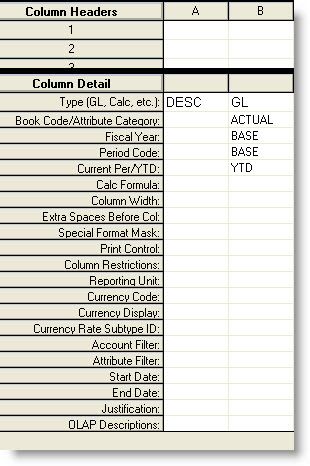
An FRx Column Layout with a YTD column:
And a YTD Column Definition in Management Reporter:
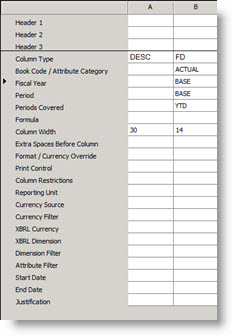
As in the Row Definition, there are so many similarities. The terminology in the Column Detail section has changed a bit in Management Reporter, but it’s still allowing you to specify the same things that you’re accustomed to in FRx. Compare the Column Detail cell labels down the lefthand side and you’ll see lots of familiar things.
One change within the values available in dropdown boxes is that FRx’s column type of GL has changed to FD (for Financial Data) in Management Reporter. Another change is that FRx’s CUR (in the Cur Period/YTD cell) has changed to Periodic in Management Reporter. But all in all…this feels the same as FRx.
Reporting Tree Comparison
FRx’s headings in the reporting tree:




And Management Reporter’s headings in the reporting tree:


There are terminology changes, but the FRx look and feel is still there.
Report Definition Comparison
There have been so many changes in what FRx calls the Report Catalog screens that it’s impossible to show before and after shots. Instead, here are screenshots of the 4 tabs for the new Management Reporter Report Definition. First, the Report tab:


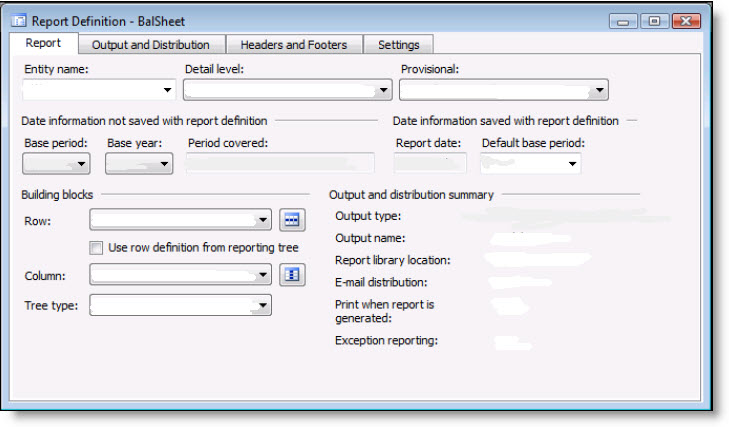
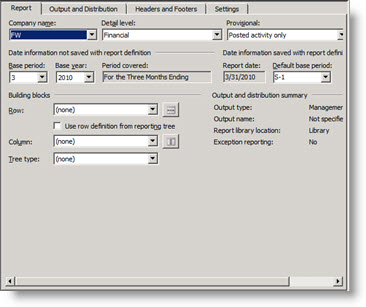
I’m so happy the Report Date isn’t in a dropdown box I could cry.
The Output and Distribution tab:
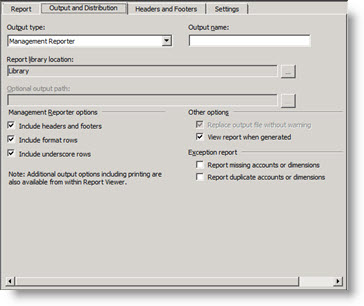
The default output type is Management Reporter. This means that the report opens in the Report Viewer. Just as in the Drill Down Viewer, you have print and Excel export options available in the Report Viewer.
The Headers and Footers tab:
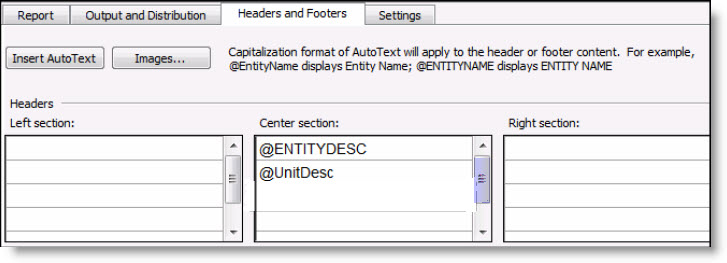
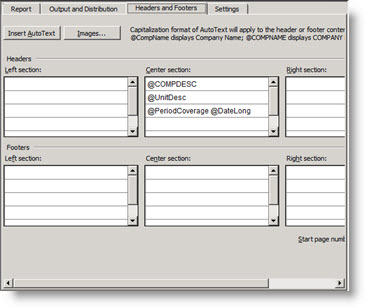
Notice the Images button!
Finally, the Settings tab:
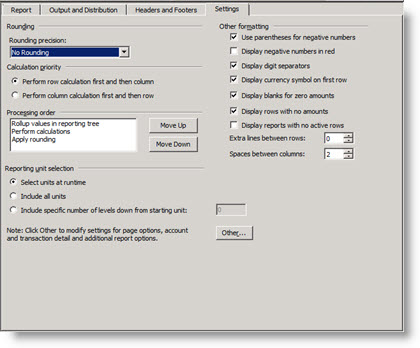
I love the control that the Processing order gives when it comes to rounding.
Conclusion
Management Reporter uses so many of the same concepts that FRx does that you should easily be able to leverage your FRx knowledge when migrating to MR.
Speaking of migrating, that will be a perfect time to clean up an FRx spec set and get it in top shape before moving it over. Archive, clean out the deadwood, leave only the reports you actually use.
(And if you decide you need a little outside assistance, I do so love cleanup work—making existing reports more efficient and ensuring accuracy at the same time—as well as migrations.) Cheers…Jan
Great write-up Jan. Very helpful.
-Chris
Thanks much. Nice writeup.
So is MR supposed to automatically convert FRx report definitions or do you have to recreate?
Link to another row set is not supported in Management reporter.
Hey thanks yall. There is a migration tool that will take an FRx spec set and convert it. That’s why it’s a great idea to get spec sets cleaned up and cleaned out. Jan
Nice comparision – Thank you very much!
Nice to see an MR write-up, Jan! Hopefully you’ll have many more of these in the coming months. :-)
FYI, there have been term changes in MR v2 for Dynamics ERP. “Entity” is back to “Company” now and “Link to Financial Data Source” is “Link to Financial Dimensions”. The “Account Filter” in column definitions and “Structure” in trees is now “Dimensions”. I’m sure there are a bunch of others I’m missing, but those are the ones that sprung to mind as I read this.
Also, in MR v2, all GLs are treated as dimension-based, even GP and SL. Your segments show up as dimensions, attributes show up as dimensions, etc. That will be a shift for those who are used to working with their accounts in FRx, but we’re hoping it’s a shift that will ultimately prove easier once everyone’s used to it.
Jeff
THANKS Jeff; appreciate the clarifications and I have some newer screenshots that I’ll upload shortly.
Jan;
From your post aboev it appears that the new MR reporter will be very limited as to the various ERP systems it will integrate with?
That’s correct, George. See this post for more information about non-Microsoft ERPs:
https://www.frxbuzz.com/the-future-of-frx-and-management-reporter-for-gls-other-than-dynamics/
We migrated. And its not as easy as expected. Specs didnt migrate that well.
Formulas are different in MR. Some FRx dont migrate and they will just error on report generation.
Budgets – if in column and doing Transaction detail – report will error. Havent figured out why. Any info?
Be careful – account masks in Trees are lost in migration. We had to re-add all these as the new dimensions. If you have big trees, plan for this.
Jan,
Just wanted to confirm – you mentioned back in your 2008 blog entry – Management Reporter will NOT retrieve project data, correct? It is only designed to report on data within the G.L.? Are you aware of any report writing tools that can report on project data? (other than crystal reports….something a non I.T. person can use…)
thanks.
Yes, to start with, MR will only pull data from the GL, although there may be small bits and pieces available from other modules (just like in FRx). Not enough to make it a full-fledged project related report writer. Sorry, don’t know of specialized project report writers. Guessing you may be using SL’s project modules, and if so I think your best bet is to bite the bullet, learn the database schema, and modify the existing reports with Crystal (or whatever is being used).
Will MR be able to pull and report on any of the Analytical Accounting data in reports that GP has for those of us that use AA? What’s this I see about not being able to link to other row sets? How do you do consolidations of multiple company’s that have different P&L structures … or go from a summary to a detail row set? What about Report Manager … the ability to combine reports, word docs, excel files, etc. and combine as one report book with sequentially numbered pages? Are these features that are planned to come out? Can MR pull data from Excel files and GP and combine? What about unit accounts from GP?
Our Dynamics consulting group is advising us not to use Management reporter and stick with FRX because they say there are too many bugs in the tool. Are you familiar with any problems with converting and using MR?
FP1 has fixed a LOT of the bugs in MR, so I just successfully migrated a large client with numerous companies and complex reports. Some bugs still remain though – for instance, you can not have a transaction level report if you have “CUR” budget (being fixed in next release), so it depends on the complexity of your reports as to whether its ok or if you should wait. FP1 addresses a lot of migration issues though
We migrated last Sept. We had some pains but got MR running. Now, it is much better thatn FRx as we have more (easy) access for managers and storing reports.
We had issue with Budget and trx/drill down. It had to deal with multicurrency, which we didnt use. MS Support gave us workaround of setting up Multicurrency for US, now those reports work. Might help your issue also.
Thanks – I’ll give it a try. Are you on FP1 now? It fixed a lot of bugs so definitely worth doing. I’m definitely liking MR now that FP1 is out.
Jan – great write up!
Thanks, and thanks for the comments!
We have just attempted to install MRT Beta 3 and understand the tool cannot properly recognize the reporting month when pulling data – this may be due to the fact that our year end is not dec. 31 but on a fiscal year instead…so for example, the tool cannot pull data for the first month (July) and so on…. so we are unable to move forward at this point. have you seen this too?
Does anyone have any tips or tricks for how to get around not being able to use Row Linking? The boxes are all in MR-does anyone know when they hope to have available? Thanks!
2 things I found not available in MR as compared to Frx.
– MR doesn’t have webport similar to Frx, you always need to install viewer for somebody to read your report.
– MR cannot cannot provide a column with chart of account numbers only on it, it always has account description.
Hello,
Has anyone encountered a situation where there are more than 12 periods in a fiscal year (due to changing of the parameters). When any period higher than 12 is selected, there is an error message “InvalidPeriodForCompany” – where does that get set up and how can we adjust it?
Thanks
JerryB
Thanks for the info Jan. I’ve been trying to figure out how to print row definitions from within MR without any luck. Is there a simple trick I’m missing, other than copy/paste into Excel?
TIA
Jack
I haven’t seen a simple trick, Jack, sorry.
Does anyone know how to do a percentage calc in a row? For example, I have my income statement going across for the years and I’m trying to calculate the profit margin percent going across. It seems as simple as setting the Format Code to CAL and taking row#1111/row#111 but it’s not. Can anyone help me? Many thanks!
Hi Tara, you’re correct that the format code should be CAL. But the formula should be @1111/@111. Then if you’re in FRx you’ll add a % format like “#,##0.00%;(#,##0.00%)”. You can go snag the format from a column layout in the Special Format Mask cell; paste it into the row in quotes and you’re good to go. If you’re in Management Reporter, there’s a separate column for the format and you can choose it from a dropdown box. That’s a very nice change from FRx.
The only other thing to consider is whether you have a CALC column. I’m guessing from the way you describe your report that you probably don’t have a calculated column. But for future reference, when you do, you should check the accuracy of your results in the cells where the CALC column intersects the CAL row. You may need to change the calculation priority (in the catalog in the advanced tab in FRx) to calculate columns first (this means the calculation on the row ‘wins’ out over the column calculation). A good example of this is you may have % of sales for each month, then in the calc column that adds them together, the % of sales will crossfoot. So it will look really bizarre. Go change this setting and you’ll be good to go.
In Management Reporter, this setting is in the report definition on the Settings tab.
OK too much information! Good luck! Jan
WE USED G COLUMN IN FRX AS A RESTRICTION ON THE COLUMN LAYOUT. SO ON THE COLUMN LAYOUT COLUMN B WOULD ONLY SHOW UP ON THE ROW FORMAT UNDER THE G COLUMN. THERE IS NO G COLUMN ON MANAGEMENT REPORTER. HOW OR WHERE WOULD I PUT THIS ON MANAGEMENT REPORTER?
Hi Gaylia…Column G “Column” in FRx is now column H “Column Restriction” in Management Reporter. It’s much more descriptive! Cheers—Jan
hello, i have a question. i got some reports in frx that had a row format linked to another row format (not de accounting). In management reporter i have lost this capability? (or a i dont find it)
Correct. This is called row linking. See April Olson’s blog post on using excel to report off other reports for an alternative to row linking.
thanks Jan. Im going to create the dimension sets.
I am trying to pull unit accounts into a report, but the balances are not showing in MR. The accounts have balances in the G/L. Has anyone encountered this? Is there a resolution?
Thanks!
Hi Jan,
Management Reporter used to have demo reports to load. All I can find is cancelled links now. I have an old version of the demo reports, but was wondering if you knew about this issue. My guess is the previous demo reports don’t work with their most recent MR2012 version.
BTW Are you going to the GPUG conference in Tampa?
Thx,
Doug
Hi Doug…I haven’t seen that but haven’t looked for demo reports in quite a while. There was a big change from MR to MR2012 so I bet you’re right. No to GPUG; I always go to Convergence though. Cheers!
Thanks Jan. I will jump right to the migration tool.
Enjoy Convergence; hope to get their myself someday.
We are having the same issue as David above. Have unit accounts with balances – only zeros showing on MR reports. How do we fix this?
Hi Jan,
Do you know in MR 2012 if there is a way to apply currency override formats for specific rows, but you still have format overrides applied also on columns for percentages, but you want for those specific rows, currency format will show instead of percentages? appreciate your thoughts on this.
Hi Jeff…I would experiment with the row’s Column E Format Override. See if that does what you need, hope so. Jan
Thanks Jan, i have a format override assigned on the Row for certain rows only. and i also have a format override on the column, but it appears that the row format override still takes precedence over what my column should do. Do you know if this is by design or how do you workaround it?
That sounds like it’s by design, but you might experiment with the currency sign in the print control cell in the row instead and see where that gets you. It shouldn’t override the column. Jan
Thanks Jan. It looks like its by design. let me experiment further
I saw on a post elsewhere on the internet that there is a way to turn off the Account Category dimension, but I cannot find that in MR and the other post did not elaborate. Is that something that can be done? I’m using 2012 CU9 with the legacy data provider.
Hi Phil…I’m sure there’s a way to do that, but because I don’t install, I don’t know how. But before you go trying to remove it, you should know that CU10 ditches the account category name and description in the drilldown, resulting in much cleaner reports. Hope that solves your problem. Cheers…Jan
We are currently converting from FRx to MR. Alot of the reports came over with errors that have to be fixed. Is there a good resource available to help us to determine what the problems are?
Hi Jason…sorry to hear about the errors. I don’t have an online resource for migration errors here. Sounds like you need your Dynamics partner’s involvement. Hope the errors will be light and fixable. Jan
Hi Jan,
I am trying a row percentage just as Tara posted above. I have the correct cal as @1280/@1070 and I’m getting 100%. Help?
Thanks,
Jane
Hi Jane…your calculation is right; you just need to add a format to however many decimal places you want. If you’re in FRx, do a search for ‘column placement’ on this site, top right corner search box, and it will show you an example of what the format needs to look like. If you’re in MR, use the Format Override column (may be column E). Best…Jan
Thank you for responding. I am using MR, and I do already have the format set to %. I have searched every inch of the internet for a solution.
Hi Jane, have you tried the below?
The only other thing to consider is whether you have a CALC column. I’m guessing from the way you describe your report that you probably don’t have a calculated column. But for future reference, when you do, you should check the accuracy of your results in the cells where the CALC column intersects the CAL row. You may need to change the calculation priority (in the catalog in the advanced tab in FRx) to calculate columns first (this means the calculation on the row ‘wins’ out over the column calculation). A good example of this is you may have % of sales for each month, then in the calc column that adds them together, the % of sales will crossfoot. So it will look really bizarre. Go change this setting and you’ll be good to go.
Sorry, I should have put the above comment to Jane in quotation marks as it’s from Jan’s earlier comment to me with my issue.
Thanks Tara. I do not have a calc column because I want my percentages to show in a row. I have the 12 months in columns and I want a percentage of Net Sales for all of the departments’ expenses listed under each department for each of the 12 months. Anyone?
Hi Jane,
Have you specified which columns to do this calculation on? Meaning, have you tried A,B,C,D,…L=@1280/@1070?
Hi Tara (and Jane)…thanks for the comments! I helped Jane a little behind the scenes via some screenshots. Everything I glanced at was correct. I gave her some troubleshooting ideas, but I think this landed in IT’s lap. If I hear about the resolution, I will post it. Cheers…Jan