Use View Subtotals! It’s one of FRx’s best features.
This tip will allow you to run an FRx income statement summarized on one of your subaccounts. When I show this in a training class, everyone thinks this is very cool. It’s called View Subtotals.
This is one row from the initial report:

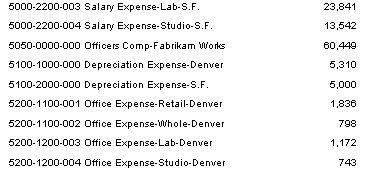
If you drilldown on the row above, this is what you normally get, totals using the full account structure:
With View Subtotals, the total is shown subtotaled by the 1st segment, in this case the natural account:
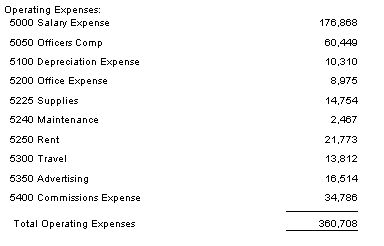
And you can continue drilling down to get to the full account structure, so you don’t lose anything by doing this.
Or you can subtotal by any other segment in the account structure, in this case the 2nd segment:
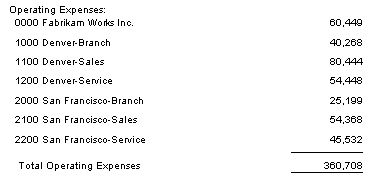
Cool, no?
Here’s how: in the report catalog, choose an income statement. Make sure you choose a Detail Level of ‘Financial and Account’. Limitation: the row should contain the natural account only, or this won’t work exactly as explained.
Once in the drilldown viewer, choose View> Subtotals, click ‘Subtotal on Segment’, and choose one of your subaccount segments. Drilldown, then you’ll see a summary of this segment of your account structure. Continue drilldown to see the full account structure as usual.
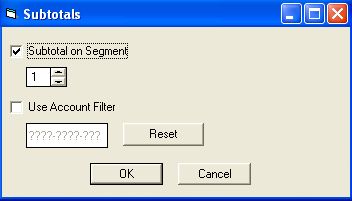
If you like this option, you can also make it the default so that you don’t have to pick View> Subtotals every time you run the report. In the report catalog, go to the Report Options tab, and then to the Acct/Tran Detail tab. On the top right corner (of the tab), you’ll find the Subtotal/Filtering Account Detail Section. Continue as above:
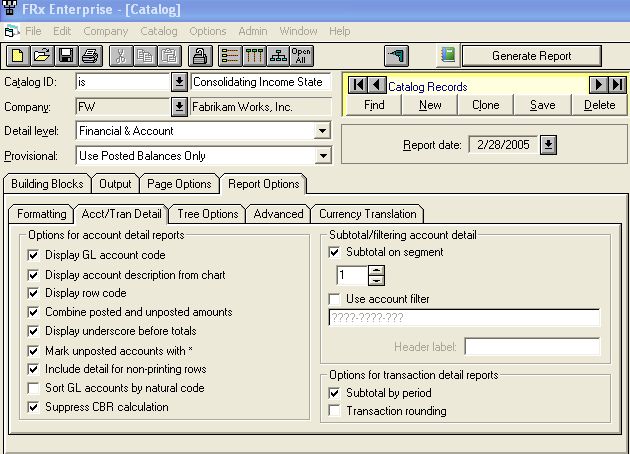
The only trap is that whenever you change the Detail Level to Financial, this gets unchecked, and you’ll have to recheck when you return to Financial & Account. Otherwise you’ll think you entered the Twilight Zone: “I KNOW I checked that….”
Very nice! Thanks!
Thank you, i finally found the missing peace in Manegement Reporter. I wonder who took the descision not to migrate this useful feature to MR.
Lets hope MS will wake up and realize that they must have a similiar feature. It is hard to explain to customers why there is not good drill-down functionality in MR…
Did this feature only work on one drill down or could you add a second and third drill down (from segment 1 to 2 or 3)
Thanks, Jonas
Hi Jonas…Agree! And Yes subtotals worked in FRx, allowing you to subtotal on any segment, then drilling further into full detail. It makes me dizzy that Microsoft hasn’t seen fit to add this in Management Reporter. I’ve been asking for it since I first saw it wasn’t on the list of features planned for MR. There’s lots more information in my post on Beer & Subtotals. I also have a couple of posts on how to create a pivot table in MR (use search box in upper right side), but that’s a painful way to make up for missing functionality. Jan