Here’s quite a discussion on FRx Service Pack 10!
I’ve been asking around and really hadn’t heard of any issues with FRx’s latest service pack, SP10. It was released in March of this year. But here’s what I’ve personally found with SP10.
FRx SP10 The Good
- There now seems to be what I call ‘accelerator’ control. In the past, when you’re using a mouse to try to highlight a large group of cells in a row format, it’s always been difficult since there’s no way to slow the mouse down. With excel, you can use the mouse like an accelerator, dragging slowly to highlight slowly, and dragging quickly to highlight quickly. There has been no such feature in FRx, and I always avoid the mouse and just use the Shift key in conjunction with the Arrows or Page Up and Page Down keys. But with SP10, accelerator control seems to be added. Sweet.
- The middle mouse scroll button appears to work, although I got it to work in a SP7 environment today.
- You now have the option to format negative numbers in red. In the Catalog, go to Report Options>Formatting tab and there is a checkbox. The downside is that you cannot restrict this to just one column, like a Variance column for instance.
- It’s much much easier to clean up a spec set. You no longer have to go to Export Spec Set to see what building blocks are not associated with a catalog. Each building block is clearly marked with a checkmark in the listing if it is associated with a catalog, making it easy to see which ones to delete.
- You can delete multiple rows at the same time. HALLELUJAH. Same with columns and trees. I love it.
FRx SP10 The Bad
- This really isn’t too bad, but the interface for opening rows, columns, and trees has changed. If you’re in a row and click the Open icon to open another row, a dialog box opens that defaults to the catalog listing. You then click on the Row tab to get to the row listing. If you’re opening multiple rows it will take more mouse clicks than you’re accustomed to. Takes some getting used to. And you’re still limited to 4 open at a time.
- When restricting column printing using Column G in the row format, the restriction appears to apply to underscores above and below the cell that’s restricted. This may be cosmetic more than anything. I hope it’s limited to underscores and that it doesn’t impact any numbers that may be there. I haven’t tested yet.
FRx SP10 The Ugly
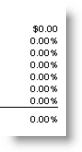
- The CS format in the row forces 2 decimals to print. Doesn’t matter if the report is rounded. Looks very strange unless you unmark ‘Currency Symbol on 1st Row’ in the Report Options>Formatting tab (for every report). It even overrides a format mask set in the column. If you’ve got a column formatted for percentages, this is what it will look like with a CS on the first row:
- There are multiple cells deleted when you’re trying to delete just one. It doesn’t happen every time, but it does happen enough that it can be a REAL problem. (As you probably know, there’s no Undo, so if this blows away a couple of extra rows that you have a complex formula on, and you haven’t saved, you’re toast.) To delete a row, I normally just right click in one cell and choose Delete Row (instead of highlighting the whole row). To be fair, I haven’t tested highlighting an entire row. Followup on 11/15/08: Since this was originally posted, I’ve worked on another SP10 site where I did NOT experience the ‘multiple cells deleted’ problem described above. The developer has not seen it and one of the commenters below has not seen it, so I’m thinking/hoping this was simply an environmental issue.
Recommendations
Despite the fantastic improvements, I’d stay away from SP10 if you use percentage columns. If you’re already on SP10, best get rid of CS formats if you’re rounding reports, or know how to add formatting to a TOT row as Ken Webber mentions in the 1st comment below.
If anyone wants to comment on personal experience with SP10, have at it!
I ran into the CS problem. The quickest fix that worked was to remove the CS format and use a number format. Of course, this was convenient in my case, as the only rows that had CS formats were TOTs – this won’t work for GL rows.
“$#,##0;($#,##0)” did the trick.
For GL rows you can use this same workaround by making the original GL row non-printing, then making a CAL row underneath it that pulls the number above and applies the special format mask.
Example:
100 Sales-NP NP 4100
130 Sales CAL @100 “$#,##0;($#,##0)”
Another great post, Jan! I hope you donj’t mind if I add some more to the “Good” category and comment on the “Bad” and “Ugly”.
The Good
* We’ve always used a third-party grid in FRx, and we upgraded to a MUCH newer version of that grid in SP10. This improved the appearance of the grid while also allowing us to make some easy functionality improvements. I actually didn’t know about the “accelerator” improvement, but here are a couple others we put in – 1) You can now double-click the line between column headers to auto-expand the column to the widest text, and 2) In the GL Link dialog (where you add accounts and account ranges in the row format), you can click the To/From headers to sort the accounts. I know there are some others I’m forgetting.
* As of SP10, you can use Windows authentication with FRx. After you turn on FRx security, you can add users directly from Windows. Those users can then securely login to FRx (Report Designer, Report Launcher, Report Manager, DrillDown Viewer, and WebPort) without entering credentials. If you use Windows users in unit security in trees, those users no longer have to remember old passwords to access reports in the DrillDown Viewer. You can even convert an existing FRx user to a Windows user and FRx will update that user in every group and tree.
* This is minor, but you can quickly change companies in FRx by double-clicking on the company in the status bar at the bottom of the screen.
* Also minor, but if you’re using FRx security, the name of the logged-in user is shown in the status bar at the bottom of the screen.
* The new Open dialog for rows/columns/trees/catalogs does a lot more than let you delete multiple items at once. It also shows you the last modified date and user for each one and shows you the last generated date and user for each report. It lets you sort building blocks by name, date modified, date created, and more. It lets you quickly search for building blocks by typing part of the name or description. It lets you print a list of all of your rows/columns/trees/catalogs. It lets you view and open associated reports or rows by right-clicking on an item, and it lets you copy a building block by simply right-clicking.
* WebPort users can now maintain versions of reports, sort reports, drag-and-drop reports and folders to new locations, and more.
The Bad
* I apologize for the extra clicks for opening multiple rows – we did so much work for the new building block dialog that, quite frankly, we missed this. I’ll make sure there’s a bug on it. In the meantime, if this is a big deal for anyone, or if you encounter other issues with the new building block dialog, you can turn it off. Click the Admin menu, click Processing Options, and select Use Classic Building Block Dialogs. This is a per-user setting.
The Ugly (if only we could do away with all of the ugly!)
* I’ll try to explain the CS problem. According to the FRx user’s guide, using CS in a row instructs FRx to use the currency format from the company’s international format for amounts in that row. If that format has two digits to the right of the decimal, every number in a CS row will have two digits to the right of the decimal. To check this format, open the company information for your company and look at the “Amount and date format” (if you don’t have one, I recommend choosing one). Then, open the International Formats and select the one your company uses. The “Amount with currency symbol” format is what we’re using for a row with CS.
Rounding in the catalog and masks in the column are ignored because of FRx’s “golden formatting rule” – row overrides column and catalog, and column overrides catalog. If you apply a font style, format mask, or formatting option to a row, it will override any other formatting options in column or catalog. If you apply formatting in a column, it will override any other formatting in the catalog. As Ken and Rick stated, the workaround is to use a CAL row with a mask. Another possible workaround is to remove the decimal in the currency format mentioned above. However, that will cause every amount with a currency symbol to be rounded in every report (which may be ok for some people).
So why do we use the currency format from the international format for CS? At one point in time, we didn’t – we just stuck a dollar sign on the front of whatever format the row would have had otherwise. That works great until you’re reporting in Euros or Yen, at which point $10,302 doesn’t fit in. :-) The only way to specify a different currency symbol is the currency format, which means we must use that currency format any time we hit a row with CS.
Now, there’s ONE exception to FRx’s “golden formatting rule” – if you use a percentage format in a column, FRx overrides the row’s formatting in that column only. The fact that we are formatting percentages incorrectly (with digits after the decimal) is absolutely a bug and will be fixed in the next service pack.
* As for the problem of multiple cells being deleted – I have not seen this. PLEASE report the issue to your FRx Support provider so we can investigate and fix it.
I apologize for the length of this comment, but I hope I’ve provided some answers and useful information.
Thank you,
Jeff [MSFT]
**This posting is provided “AS IS” with no warranties, and confers no rights.**
Something I’ve noticed since installing SP 10–after exporting a report to Excel, if I copy the worksheets to another workbook, any shading on the report becomes black. This never used to happen–not sure if it is an FRx issue or an Excel issue.
FRx Security or SP10/Hotfix issue?
I haven’t figured this one out yet, so thought I would throw a comment on here to see if anyone else has the issue, or understands where I am going wrong…
Some “background” – I am finally upgrading from FRx 6.5 to 6.7 SP10 with SP10 Critical Add-In (Solomon 5.5). Since we used FRx security in 6.5, and desire to have stronger access security in 6.7, I am trying to work out the options.
First item – it appears that the choice in “FRx Security Information” (Admin, Organization, Security button) to choose “Require User Log-in” or “Use Network ID” is no longer in the screen. The only choice is the checkbox for “Use FRx Security” and minimum password length.
Setting up users in User Information – it is easy to add users through the Add Windows Users option, however, I am not sure that it does what I expected. The options available in editing the user is to choose Application authentication, or Windows Authentication. Choosing Application makes the password dialog box available, and Windows does not, so the assumption is that it is user the Network ID to authenticate the user.
This apparently works, until choosing a default company, when I receive the error – “The login failed for the xxx company. Make sure the login ID and password are correct and verify the settings on the System Specific Information page in Company Information”, clicking on Details gives this additional info – FRx32.OFSIMain.CheckOFSIConnection 40002: Unable to create RDO Environment. Please verify DSN information.
In trying to research the issue, I found Knowledge base article 855767, which apparently suggests creating SQL log-ins to have access to FRx. This also says to make the user have db_datareader and db_datawriter roles. This would give the user direct database update capabilities using SQL Query, so it is not an option.
Is this truly the only security model that would be based on network authentication?
I will continue testing, but it appears to me that the only way to use network user ID is to choose Application authentication, which will require a separately maintained password within FRx.
If anyone has any suggestions or comments, please let me know!
This same question was posted out on the FRx discussion board:
http://www.microsoft.com/communities/newsgroups/en-us/default.aspx?dg=microsoft.public.solomon&mid=1956ff7c-6b79-4733-9e8f-4c9a58834795&sloc=en-us
Someone responded with the following resolution:
“For the “FRX32.OFSIMain.CheckOFSIConnection 5: Unable to create RDO
Environment. Please verify DSN information.” Please verify that the
Master60SP password is correct in both SQL and FRx Company | Information |
System Specific. After you have verified that the Master password is
correct, please re-run the SL script(s) which came with your Service Pack
of FRx. This should clear up any problems with this error “
Since we are using Solomon 5.5, there is no Master60SP password in Solomon (setting introduced in Solomon 6.0).
Thanks for the link – I will also read through that board.
It is my understanding that FRx 6.7 SP10 is not supported with Solomon 5.5. My sources tell me that Solomon 5.5 is no longer a supported application. Are you aware of this?
Your options would be to upgrade your version of Solomon and FRx to the latest versions, or stay on your current old version for both products. You can try running FRx 6.7 with service pack 5 or lower to see if that works with Sol 5.5, but I can’t guarantee that it will.
Hope this helps.
Yes we are aware that Solomon 5.5 is not supported any more. We have so many custom applications that will not work with 6.0/6.5/7.0 that were created by multiple vendors (some no longer in business) that we can not upgrade without losing functionality.
I never found anything on the information for the service packs that said Sol 5.5 was no longer supported, so I automatically went with the latest service pack.
I will try reinstalling with Service Pack 5, but improved FRx security was our primary reason for upgrading FRx in the first place.
Jerry, I hope the information below will answer your question.
I’m going to give an overall explanation of FRx security to help anyone that might be interested (for any GL), and then I will drill into the specifics for Solomon.
Before I get started, I’d like to clear up one thing – we NEVER require db_datawriter for direct SQL users with FRx, so that KB article is incorrect.
There are two different types of security involved when you’re using FRx. One is your GL system’s security, the other is FRx security.
GL system security is in place regardless of the state of FRx security. When you select a company in FRx, we authenticate you with your GL system. The way we do that is different with each GL, but this typically requires credentials to be entered. For some GLs, direct database access is required, so you enter a SQL login and password. Other GLs provide their own security methods that we use, and those typically require a login and password for that GL system.
When FRx security is NOT turned on, any user can start FRx and access demo companies, report definitions, etc. When you select a GL company, you are asked for credentials. The login dialog will have a title of “Database Login for Company “. These credentials are used to access your GL system. Once you enter valid credentials, the company is set as default, and FRx allows you to continue.
When FRx security is turned on, the first thing you will see when you start FRx is a login dialog. This dialog will have a title of “Security Login”. If you don’t enter valid credentials here, you aren’t allowed to use FRx.
Now here’s where people often (understandably) get confused. When you select a GL company after logging in to FRx security, FRx tries to do help you out by passing your FRx credentials straight through to authenticate you with the GL. If your FRx credentials and GL credentials match up (many customers do this), you login only once to access everything. However, if your FRx and GL credentials do not match, you will see a login failure – we tried to authenticate with the GL, and it didn’t work. When you click OK, you will see another login dialog, this time with a title of “Database Login for Company “. Once you enter your GL credentials here, you’re allowed into the company.
What I’ve explained to you so far is the way FRx has worked since FRx 5.x and it still works this way today. Of course, we’ve done some things in FRx 6.7 to make this even better.
As of 6.7 SP3 or SP4 (I can’t remember which), FRx can use Windows authentication to connect to a GL system that uses standard SQL users (Solomon doesn’t). If you choose Windows authentication when configuring the ODBC datasource for your company, FRx will suppress the login dialog for the company and attempt to connect directly to the database with your Windows credentials. With this configuration, you either enter just FRx credentials and you go straight into your companies, or you enter no credentials at all (if FRx security is not enabled).
So now we’ve come to Windows authentication and SP10. As you’ve noticed, you no longer see the Use Network ID option in FRx 6.7 SP10. For several years, I have been telling any customer using FRx security to avoid that option. It was added back in the Windows 9x days, and it’s simply not secure past Windows 9x – I’ll leave it at that. For SP10, I finally got to remove it, which made me quite happy. :-)
With SP10, you can now add users directly from Windows. We allow multiple scenarios for this:
1) Add a new Windows user by creating a new user, choosing Windows authentication, and then selecting the user.
2) Convert an existing FRx application user by selecting the user, choosing Windows authentication, and then selecting the user.
3) Add multiple Windows users at once by clicking the Add Windows Users button – you can choose several users, click OK, and we’ll create new FRx accounts for each one.
4) Upgrade from Use Network ID to Windows authentication. After SP10 is installed, any FRx administrator that logs in will be asked to map network users to Windows users.
When you convert an existing FRx user to a Windows user, FRx even updates groups, reporting trees, catalogs, and specification set security for that user. Please note, however, that the user must still use their old credentials to access previously-generated reports in the DrillDown Viewer.
Once your Windows user is added in FRx, you can choose “Use Windows authentication” in the Security Login dialog the first time you log in, and from that point forward, you’ll get right in when you start FRx. Please note, however, that FRx will still try to pass your FRx credentials (now a Windows user and no password) straight through to the GL. If that fails (it probably will), just click OK, then enter your GL credentials.
Now for the Solomon specifics …
When you set up a Solomon company, you’re asked to provide the master password. FRx uses the master login (‘master’ for older versions of Solomon, ‘master60sp’ for newer releases) and the password you provide to connect to the SQL Server and Solomon database. From there, we use the credentials you provide in the “Database Login for Company ” dialog to authenticate you with Solomon. If the user you enter in that dialog does not exist in Solomon, you won’t get in. The error you’re currently seeing tells me that FRx isn’t able to connect to the SQL database. Make sure you’re logged into FRx as an FRx admin, then edit the company, go to the System Specific Information tab, and enter the password for the ‘master’ SQL user.
I should also point out that the Dynamics SL (formerly Solomon) team added Windows authentication in their 7.0 release, and we support their implementation of Windows authentication in SP10. To use Windows authentication to connect to Dynamics SL 7.0, just edit the company in FRx and select the “Use Windows authentication” check box on the System Specific Information tab.
That’s pretty much it. I apologize for the length of this post, but I hope the details will help anyone who happens to find this.
Jeff [MSFT]
**This posting is provided “AS IS” with no warranties, and confers no rights.**
I’ve run into a couple of significant problems with SP10 using Dynamics GP. When you generate a report to a Formatted Excel file using a detail level of Financial & Transaction with a tree, and you use a column type of any of the transaction detail codes or vendor data types for transaction, only the last unit of the tree in Excel will show all the transaction detail. The other units do not show this information in Excel.
Also, if you run a report to drill down, the view of the report cuts off so you can’t see some of the transaction details. The shrink to page width doesn’t work.
To Jerry, I don’t think you can upgrade 6.7 all the way. I have a few clients still on Solomon 5.5 and FRx 6.7 with Solomon FRx SP build 3073 – so i know that works. Both customers used to be on 6.5 and noticed much better report generation times by going to 6.7. Also the install screens say “FRx for Solomon 5.5 or 6.0” across the top of them although I’m not sure how reliable they are.
Hello Jan:
During this past year we have been hoping that we can finally use FRx Report Manager with SP10 that corrected a problem with the print fonts in the prior SPs. However we were unsuccessfully in printing a report books in report manager. Our systems engineers were finally able to determine with Microsoft FRx support that a bug exists in SP10. Please see the support request below. Oh well, now we have SP11 to look forward to.
Thanks.
Frank Pidoto
PS. Please keep up with the great job with this website. The information you provide is extremely valauable.
Excerpt from: Existing Support Request Incident xxxxxxx
We have had cases with your issue in the past. The problem appears to be a bug with FRx 6.7 Service Pack (SP) 10. Unfortunately due to the length of time between our next service pack, the best solution at this point may be to roll back to SP9 or reinstall FRx and only apply SP9 (not SP10).
This issue has been written up as bug # 25163, titled ‘Only the user that installed FRx SP10 can Print/Print Preview Report Books from Report Manager.’ At this point the bug is so new that it has not been assigned as ‘fix date’.
I did find the information below at the following location on the Citrix site that may also relate to this issue. This is new information that I don’t think has been tried in the past. I can’t test it here because, again, I don’t support Citrix issues and don’t even have a Citrix bench system to test with. If you would like to run through the information below and report back with your results (you don’t need to do this of course) it may help to address these issues in the future.
http://support.citrix.com/article/CTX101856&searchID=20953059
Thanks for the kind words, Frank. Re your comment, I took the liberty of removing the case id and the name of the Microsoft rep. Thanks for letting us know about the Report Manager problem.
Re Report Manager, you might think about using the technique that I describe in https://www.frxbuzz.com/how-to-create-an-adobe-pdf-binder-from-frx-reports/ to create binders. You can use the same technique to insert Excel and Word reports; they don’t have to all be FRx reports.
To All: I just finished an engagement at another SP10 site and did NOT have the showstopper problem of multiple cells deleting when I delete one row. Thought that was quite significant.
One thing I did run across was this: I italicized a CBR row but it was followed by a Default font row. Everything appeared fine in the drilldown viewer, but when I exported the report to Excel, the Default font row just below the nonprinting CBR (italicized) row was italicized. Not a huge deal but thought I’d mention it.
Jan,
Awesome post!
My 2 cents: for us and those of our customers on SP 10, it has been working just great. I have not seen an issue with deleting cells or rows at all. Not once. Maybe I have just been lucky and I will definitely keep a closer eye on this now after reading your post. The CS formatting is a non issue to us. I had no idea it was such a big deal to so many.
Thanks Victoria! I’ve seen your posts in the forum and really appreciate the feedback. I’ve edited my original post to add a followup note re deleting multiple cells.
Look forward to meeting you one day! Jan
I just found this workaround for the CS currency rounding issue. Found it on the FRx forum at microsoft.public.com. The commenter was wondering why some of her reports rounded and some did not.
“I discovered one difference that apparently changes how the 1st row currency symbol and the whole dollar rounding from the catalog affects the report. If the 1st line of the row is blank or has a Desc, the 1st row of data rounds correctly with the currency symbol. If the 1st line of the row contains data it gives the decimal places and needs the workaround and will show $0 even if “Display blanks for zero amounts” is checked.
So I just added a blank NP line in the row and my first line now includes the $ and rounds to the whole dollar. Don’t know why that works but I’m thankful it does!”
Hi team,
Can any body confirm if there could be any possible problems if SP10 is updated with Forecaster 7.0 being implemented in the environment? Also are there any updates in SP10 related to functionalty that would aid reporting with Forecaster?
Thanks
Ragu
Does any one have an idea when Microsoft will address any of the issues in SP10?
I have the same issue as Pete S. described with Transaction Detail reports with a tree.
Still struggling with the issue of the CS (currency sign) format in the row overriding the column’s percentage special format mask.
Got the first row to work by using the setting on the catalogue instead of a CS in the row. I’d really like to get a $ on the Net Income TOT row as well, but using a CS in the row changes all the percent columns as well. *yuck*
Any word on hot fix or updated SP from Microsoft would be great.
thanks.
There won’t be any hotfix for the CS issue; I say that with about 90% certainty. We hope to have SP 11 out in spring of 2009 but fall may be a safer bet.
I’m plenty familiar with CS overriding the formatting of the percentage column, I wrote the bug on it.
Funny to see my response here, it was I that sent the case notes Frank mentioned on 11/13. That bug I didn’t write but found those notes, in part, in another case. Looks like a nightmare.
As for the problem of multiple cells being deleted… I’ve never seen this. Anybody who has this issue should make a case for it with MBS Support. We don’t charge for bugs, so don’t worry about a fee.
Lance –
Thanks for the update, and your honesty. It’s appreciated. The work-around works for now.
Merry Christmas
Lev and Peter, regarding the issue with Excel and Transaction code columns this is a known issue reported in Bug 194596 “Transaction Detail Code information not appearing for all child units except the last unit after exporting to a Formatted Excel file with Service Pack 10”. This is scheduled to be fixed in the next service pack SP 11.
The workarounds are:
1. Generate the report one unit of the tree at a time.
2. View the report details through DrillDown Viewer by drilling in.
3. Generate the report to Excel (not Formatted), and copy and paste the detailed information into separate worksheets.
4. Generate the report without using a tree.
Kim [MSFT]
**This posting is provided “AS IS” with no warranties, and confers no rights.**
Any news on time frame for SP11?
Thanks
Chris
We do not have a timeline for the next service pack yet.
Kim
The latest update I’ve received on SP11 is that we’re looking at availability for the Dynamics products around August with the other GL’s to follow. Several meetings and discussions are still pending to get an exact schedule.
We can safely say late Q3 (calendar) is the expected timeframe until we receive further updates.
I’m having the same issue as Lev and Peter with regards to the Excel output, and it seems unfortunate that we should have to wait for a complete Service Pack to fix this issue. Is there any chance that there can/will be a hotfix posted? We just installed SP10 when we migrated to a new server so that we could implement the Windows authentication, only to find this bug, which affects work we do every single week. I had already found 3 of the 4 workarounds, but none of them are very efficient. I’m using FRx with Sage’s MAS200, but I’d hope that wouldn’t affect whether or not I could get a hotfix if it was available. I’ve checked their support site already and there isn’t one posted.
Any help? Please?
Jason
Jason,
There is not going to be a Hot Fix issued for this issue. Our next Service Pack, SP11, will be released in the September/October time frame but I do not have a conclusive date.
I apologize for your inconvenience regarding this issue and I can only offer the suggested workarounds listed above.
Thank you,
Kim [MSFT]
**This posting is provided “AS IS” with no warranties, and confers no rights.**
I am referring to the CS issue mentioned above. I applied FRx 6.7 Service pack 10 to a customer who has 15 companies and hundreds of reports. They do not use Multi-Currency. They did not have time to go into each row with a CS designation and change that row to a CAL row and/or add formatting to each of those rows. That meant that for this quarter they had to let the reports go out with the top line, the totals and any CS line showing .00 even though the reports were supposed to round to whole dollars.
The work around I chose, was to go into each company and select USD for the amount and date format. By the way, not making that selection that makes rounded reports look really bad. Then change the international formats by removing the decimals in the currency field. This means that when they need to run a report that is not rounded they have to go back and fix this field.
What I have not seen in this very helpful posting is that no one is calling this a bug. When you don’t use the Currency Symbol the numbers are rounded / printed properly without the decimals. When you use the Currency Symbol the numbers should be rounded / printed without the decimals. End of story.
“What I have not seen in this very helpful posting is that no one is calling this a bug. When you don’t use the Currency Symbol the numbers are rounded / printed properly without the decimals. When you use the Currency Symbol the numbers should be rounded / printed without the decimals. End of story.”
Not quit the end of story.
From the FRx Help files:
Print Control Column
CS
Uses the currency format designated in International Formats for the currency sign (for example, $) on all amount columns, except percentage columns which never receive a currency sign. (On the Company menu, click International Formats to set up the currency formats, including currency sign and decimal amount formatting.)
As you found out, the CS pulls from the International Formats table. So you see, the CS is working as designed.
It’s an interesting thing really; in previous SP’s the catalog’s rounding setting (Catalog | Report Options | Rounding of Amounts) was overriding the CS Print Control (column F) setting of the Row format. The formatting of CS lines is pulled from how the currency is setup in Company | International Formats. This was identified as bug number 31740. So many people got used to this bug that now that it is fixed in SP 10 they thing that the ‘fix’ is a ‘bug’.
So that’s my official Microsoft answer. The human part of me thinks that there should be a way to select if you want the International format or catalog rounding on CS rows.
I actually wrote this issue up as a bug when SP 10 first came out but it was rejected and not classified as a bug. So I’ll tell you what I tell others; vote for this to be a change on the suggestion link. (SP 11 will be out yet this year so I’m sure there will not be any additions like this to it, but maybe in SP 12).
**canned tech support text follows**
I understand your issue and think it is a great suggestion for a future release.
Microsoft has consolidated feedback systems and we are now using Microsoft Connect for all feedback. The Connect site requires users to login with a Microsoft Live ID profile. So, to gain access to the Connect site, you must first register in Connect and join the Connect for Microsoft Dynamics Group. If you have previously signed up in the Connect site for other programs, you will still need to click on the first link to join the Connect for Microsoft Dynamics program.
If you are new to Connect for Microsoft Dynamics, use the site below to register:
http://connect.microsoft.com/InvitationUse.aspx?programID=1517&SiteID=104&InvitationID=1621-8BTG-KFFJ
If you are already signed up for Connect for Microsoft Dynamics, use the site below to add a new suggestion or enter a vote for an existing product suggestion:
https://connect.microsoft.com/feedback/default.aspx?SiteID=104
After you register, you will be able to apply for participation in numerous programs on the Microsoft Connect site. Benefits of registration include the ability to download files, submit feedback on various products and technologies, vote on feedback, or validate existing feedback items.
Jason,
This was reported as Bug #212217, it was just mentioned it would be fixed in Service Pack 11, but we have had this documented as of Service pack 10 release.
Let me know if you have any more questions.
Kim
Alan, Lance, et al.,
I have some additional information I can provide on this, and hopefully some better news.
The CS functionality has a pretty lengthy history that goes all the way back to FRx 6.5. In SP7 for FRx 6.5, we fixed a bug in which a column mask was overriding the CS in the row format. This was where we established that, as a row option, CS overrides any column formatting mask or option (except for a percentage mask). Unfortunately, the original fix did not take into account various other combinations, and we’ve received (and fixed) a number of related bugs since. This includes combinations of CS with column masks, CS and SR (suppress rounding), CS and B0 (print blank for 0 amounts), CS with non-US currencies, and several others. There have been CS-related changes in several service packs, but the most impactful appears to have been the change made in SP10. It was at that point that we made CS work exactly as it was documented – it always uses the currency format from the International Format, regardless of rounding or any other setting. Of course, we obviously broke it with regard to percentage masks in the column (which remains the one exception to the rule).
With SP11, the area of code that handles CS and some of these combinations has been rewritten. This was a particularly nasty area of code that had seen many fix-break-fixes in the past, so I am hopeful that the new code will work much better. The new code also now supports rounded forms of the currency mask from the international format, so CS will combine with the catalog rounding (and still respects the spirit of the documented functionality). We’ve retested all of the previous CS-related bugs with this new code, and all of them are still working as expected. For example, CS won’t override the column percentage mask, CS with an SR will override the catalog rounding, and CS with a non-US currency symbol will work correctly.
I can’t promise that no one will find bugs with the new code, but we at least know it works for all of the previously-reported scenarios, and it works better than it has in previous releases. We’re also making sure we do much better testing in this area so that hopefully we don’t release the same kind of issue again.
I want to say that I really appreciate the comments brought up on this entry (particular by Jan and our customers). I read all of the comments (on this site and on the FRx newsgroup), I share the comments with others in my group, and I keep the feedback in mind when we’re working on FRx service packs. We can’t always do as much as we’d like, but we do take the feedback seriously.
Thank you,
Jeff [MSFT]
Software Development Engineer
Thanks Jeff,
I have been using and training on FRx for 10 years. You have saved me a great deal of time as I was about to try to convay to everyone I know, including my family who know nothing about what I do, that this service pack forces any user who uses rounding to change thier reports because the first row of the report is by default a currency row…. etc, etc, etc….
I will now be looking forward to service pack 11 and using service pack 9 for all those who do not have AA installed.
Thanks again for the explaination!
Alan
Jeff,
Thank you very much for keeping us updated on this. It makes a huge difference to us and our customers that you and your team are looking at all the posts out there and are not only responding, but taking them into consideration for development.
Thanks again,
Victoria
Yeah, what Victoria said!
I’m seeing SP11 was posted at Microsoft’s site on 12/3/09 – how soon before it makes it to Sage? I would love to see a Good/Bad/Ugly for this release as well!
I am posting this for Kim at Microsoft. This is such important information that I’m also going to create a separate post for it. Here’s Kim:
Hi Jason,
Microsoft FRx released Service Pack 11, R11670, for all Sage Products. However, Sage Software will put the Service Pack through their own certification process before releasing it to Sage customers. Service Pack R11670 is posted currently for all Sage Products on the Microsoft Download Site, http://www.microsoft.com. To download Service Pack 11, go to the Microsoft Download Site, http://www.microsoft.com, click Downloads and Trials, then Download center. In the Search field type in, FRx 6.7. This will return all listings for Service Pack R10670 or R11670 depending on the General Ledger System (Service Pack 11 has not been released yet for some General Ledgers).
Regarding the Good/Bad/Ugly, I can give you highlights for Service Pack R11670 as follows:
•Windows 2008 and Windows 7 will be supported with FRx 6.7 SP11. for IIS6 or IIS_IUSRS and IUSR for IIS7. One additional highlight is that you can now select either Windows Authentication or Anonymous Authentication during the installation and it will create the WebPort virtual directory according to what you selected.
•The FRx WebPort will be supported with Windows 2008 and Windows 7. A separate download is necessary to install FRxWebport SP11 to be supported on Windows 2008 and Windows 7. This will be available on MS Downloads (the same place where all the FRx Service packs are stored) eventually but not currently uploaded yet. Windows Vista will continue to be not supported with FRx WebPort.
The new WebPort installation will work on Windows Server 2003 and Windows Server 2008. In addition, the Web Printing functionality has been updated to work with BCL easyPDF 6.0 (our previous version was 3.11). If customers install SP11 on an existing 2003 server with BCL easyPDF 3.11, it will continue to work fine. If you set up a new server (2003 or 2008), you will be able to install WebPort from the new installation and install easyPDF 6.0 and it will work with both 3.11 and 6.0.
The new WebPort installation is an MSI and as stated it will be available on the Microsoft Download Center. The installation works the same with updated permissions such as correctly adding the IUSR_
•Office 2010 will not be certified in this cycle. However, there was some limited testing and it does work.
•64-bit version of Windows will not be supported. Customers will have to use Virtual Machines. A new feature in Windows 7 allows users to download Windows XP Mode. This is a new feature in Windows 7, available in Windows 7 Professional, Ultimate, and Enterprise, provides a licensed copy of Windows XP with Service Pack 3 in Virtual Hard Drive (VHD) format. When installed with the proper integration components, it allows you to run Windows XP in its own virtual machine, separate from the host Windows 7 installation. The location for the download and additional information about XP Mode is available at this URL: http://www.microsoft.com/windows/virtual-pc/default.aspx.
•The previous issues with percentage and dollar formatting using CS are resolved in this service pack, along with other fixes in the service pack listed in the Release notes.
Thank you,
Kim [MSFT]
**This posting is provided “AS IS” with no warranties, and confers no rights
Hi,
I’ve installed service pack 11 and have a couple of issues.
Firstly, I am unable to install the easyPDF Printer Driver from the msi package as per the installation instructions. I get a message saying “The setup program cannot be used unless Microsoft FRx 6.7 Webport is installed”. Clearly (since the Webport upgrade process created th BCL directory in which the easyPDF driver msi sits) Webport is installed. I am logged on as an administrator and am stuck. I can’t give this to clients if it doesn’t work.
Secondly, what is the story with no 64 bit support. The world is moving to 64 bit, my laptop is 64 bit and we have no 32 bit servers. We have moved our clients to 64 bit servers (as per Microsoft). the use of Virtual Machines is just a workaround not a fix. Do you seriously expect us to go to paying clients and tell them to either use Virtual Machines or keep old 32bit machines running if they want to use FRx? Their reaction will not be positive. Either FRx needs to support 64 bit or Management Reporter needs to become available and needs to support all of the Dynamics ERP’s. Anything else is simply not good enough and totally unacceptable.
Regards,
Geoff
Geoff,
Did you apply SP11 to an existing WebPort installation? If so, you do not need to install BCL easyPDF 6.0 – WebPort will continue to work with the previous version (3.11). BCL easyPDF 6.0 can be installed if you install WebPort from the new FRxWebPort.msi we released with SP11. That MSI can be installed on Server 2003 and Server 2008, but is only required for Server 2008 installations.
As for the lack of 64-bit support – there are a number of technical limitations that prevent us from supporting FRx 6.7 on 64-bit Windows. FRx is not a C++ or .NET app that can simply be ported over. Beyond that, there are issues and limitations we encountered with interoperation between the VB6 and .NET code in WoW64 that are not simple to overcome. Therefore, the solution for running FRx in a 64-bit environment is one of the following:
Report Server/WebPort – Use a 32-bit Server 2003 or Server 2008 VM. Windows Server 2008 and 2008 R2 include Hyper-V and the licensing allows you to run one (Standard), four (Enterprise), or unlimited (Datacenter) VMs. Hyper-V makes this easy to accomplish without additional cost and overhead. Alternatively, you can continue to use Report Server and WebPort on an existing, older server – those components do not require a lot of hardware, and they should be running on their own server anyway.
Clients – Use a 32-bit operating system on an older machine OR on a newer machine – you can still install 32-bit Windows on a newer 64-bit computer. Alternatively, use Windows XP Mode in Windows 7 Professional, Ultimate, or Enterprise. XP Mode will allow you to install FRx on a 64-bit version of Windows 7 – FRx will simply run on an XP VM in the background while still appearing to the user as if it’s running on Windows 7 itself. Windows XP Mode was created for this very purpose.
Management Reporter has just been released as a Beta for Dynamics GP. It will be released for the other Dynamics ERPs as we sync up with releases for those products.
Thank you,
Jeff
Unfortunately the next release of AX will not be out until next year so we have another year to wait. Practically it will be longer than that as we will not be implementing a new version of AX for our client base immediately.
Not a very satisfactory situation when you are trying to convince a client that Microsoft is a serious contender that takes reporting seriously.
Regards,
Geoff
Can I do 2 special format masks in one row? I have a Total row with a variance percentage column too. So I followed KB art 961056 but want to do the following
B=B1810 “$#,##0”,E=E1810 “#.##%”
It’s not working, any suggestions? FRx6.7 sp10
Has anyone heard or seen where Frx SP11 removes all of the Budget/Forcast column information and makes them zeros?
Anyone had either of these 2 issues?
FRx SP 11 – GP 10 latest (not year end) SP and Windows 7, when we export an FRx report to Excel (formatted), no header appears,
2nd issue, generate a report, hit save as to save the frd file to anywhere, file appears but then disappears.
Thanks
Is their a way to put percentages in rows in order to make calculations such as what is a margins percentage of revenue.
Yes, absolutely. The best free resource for this is actually FRx help; look up calculations> multiplying and dividing. Then you can search this site for more advanced information on calculations.
This is an excerpt from my FRx training manual FRx in 8 Hours—Introduction
“After you create and understand the above, it’s time to go one step deeper and talk about Calculations. Just as the TOT format code is used for adding and subtracting, the CAL format code is used for multiplying and dividing and for complex calculations and if/then/else statements.
On row 234 below, you’ve got the calculation formula followed by percentage formatting.
The calculation formula is the row code for Gross Profit divided by the row code for Total Revenue. BOTH row codes are preceded by the @ sign. Do NOT forget this or your calculations will be wrong.
The percentage format is as follows (follow the cal formula by one space):
“#,##0.00%;(#,##0.00%)”
Note that there is a sign flip on this row since it uses an account that has had its sign flipped.”
The screenshot in the manual shows this for row 234:
Gross Profit % CAL @230/@206 “#,##0.00%;(#,##0.00%)” C
The manual isn’t free, but the excerpt above is. :)
Cheers—Jan
*****Can I do 2 special format masks in one row? I have a Total row with a variance percentage column too. So I followed KB art 961056 but want to do the following
B=B1810 “$#,##0″,E=E1810 “#.##%”
It’s not working, any suggestions? FRx6.7 sp10*****
I am having this exact problem. This was working in FRX SP9 but we have recently upgraded to SP12. I havent been able to get this to work again. Can someone help me out?
I just tried a quick test on SP11 and it didn’t work.
Jan, I have a column format with 2 columns, with columns before and after, that are set to “NP”, yet they still print. I’ve searched the web and found an issue relative to row formats with a row set to “NP” that still prints but nothing relative to a column.
Anty thoughts?
Nope, haven’t seen that. I’d do a simple test with a brand new column, and if that works, just use it to recreate the column layout. Cheers.