What to do when you want to run several FRx reports?
Run them one at a time? Well, most people turn to Chaining in the Output tab. That’s all well and good, but often I like to use Launcher instead. It’s fast and there’s no setup involved.
(Launcher was technically designed to allow non-designer users to run reports. Most folks don’t want the CFO in there fooling around with the designs, right? Give them Launcher and allow them to generate reports all day long without touching the FRx Designer.)
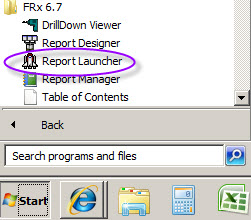
But another great use is having it run multiple reports for you. Here’s how. Open Launcher—it is a separate program that installs in the FRx program group, so go to Start>Programs>FRx 6.7 and you’ll see Report Launcher.
Open it (you don’t have to close FRx Designer), select the appropriate Company you want to view, highlight multiple reports using the Shift or Control keys, and click Generate Report. It will ask you for login credentials; enter these and the reports kick off. There are exceptions, I know, but these generate quickly. And it’s great to run them unattended so you can move on to other things while they are processing!
This is a screenshot of all the balance sheets and cashflows to be generated. I used the Shift key (you can also just highlight and drag). I could have also used the Control key to add additional reports to be generated:
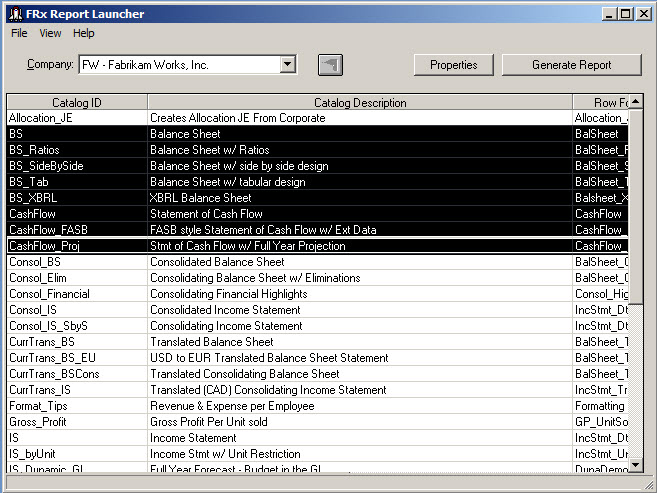
Launcher lists only the reports for that one company, so the list of reports could very well look different from your list of reports in Designer. Repeat for other companies if necessary.
I like to use Launcher to generate every report at the beginning of a day, then when I go into the catalog, each report has already been updated. And using the Drilldown Viewer I can print, or just view, without having to regenerate. As always, it’s a great idea to make sure all your reports have a footer that contains the date and time so you can tell at a glance when the report was generated.
Just as with chaining, there are a few things to pay attention to:
- Report date: all catalogs need to have the same report date
- Output: if output is Printer and your Detail Level is something other than Financial, you’re going to get reams of paper. I like keeping output at Drilldown Viewer and Detail Level at Financial & Account so you can drilldown.
- Tree Options: in the Report Options tab, Tree Options tab, if Select units at run time is selected then your report won’t generate automatically without stopping to ask you which units you want to select. I often pick ‘Include all units’.
Hope this gets you out of the office sooner!
In FRx I am trying to run two reports at once. I’ve tried both chaining reports and using report launcher, but in both cases only the second report is generated. Anyone have any idea what I am doing wrong?
Hi Norm…you might try checking the output tab for the first report. It may be going somewhere wacky. Cheers…Jan
Hi Jan, thanks for this post, I haven’t even used Report Launcher!:)
But this tool is great!
I wonder if there is a way to set up the output so it generates straight up PDFs (I know, in Designer it’s possible to edit printer setting to have it as PDF)?
Hey Vic…personally I like to keep the output on drilldown viewer, making sure all reports generate to the same location, usually io_data. Then after they all generate, go to io_data, open each and Control-P to print, switching the printer to pdf if you have to. Then you can go one step further and combine all the PDFs into one binder. Cheers…Jan
Is there a way to organize a group of reports in Chain or Launcher so they come out in a certain order instead of alphabetical order??