FRx to PDF—a couple of ways
FRx doesn’t really support creating PDFs other than through their WebPort product (purchased through your GL vendor).
However, here are a couple of ways you can generate a PDF file from a drilldown viewer file. You’ll need a PDF printer driver installed.
With the appropriate report open in the drilldown viewer, choose File, Print, then click the Printer Setup button and choose the PDF printer, and when you click OK twice, the PDF printer driver takes over and generates the PDF. Exactly what happens from there depends on what PDF software you’re using.
There’s also another possibility, one that will give you a way to create PDFs from multiple files.
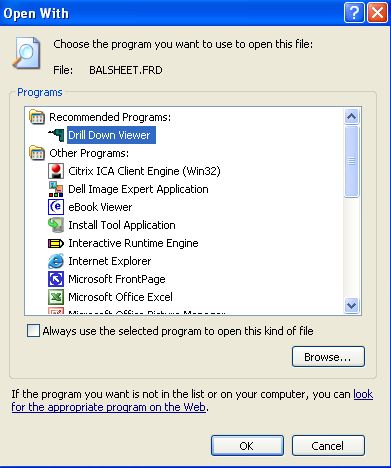
First, register the .frd extension (this is the file type for your drilldown viewer files) as a file type on your workstation. Here’s how: right click the .frd file, Open With, and if it’s not already associated with the Drill Down Viewer application, Browse to your FRx installation and associate it with Drill32.exe, and check the box to Always use the selected program:
Then, in Adobe, go to the File menu, Create PDF, then From Multiple Files and select your drilldown files.
PDFs are increasingly important in the workplace from a legal standpoint.
In addition, they can be sent to your own website without using the FRx WebPort. Who knew!
Thanks for having this on the site! I could not find anything on Microsoft’s Knowledge Base except “FRx does not support PDF” yet I knew I had printed to PDF before…I checked your site and found yet another answer!
I appreciate all the work you put into keeping us FRx Writers up to speed!
Thank you very much, Kim! There are also cool things you can do with Adobe, but I haven’t posted on that. Yet!
hi all, i has alternate workaround on automatic schedule printing PDF from FRX.
i has install FRX designer, FRX Report Server, Bullzip PDF Printer at my server.
1) Install Bullzip PDF printer and set as default printer. Configure the Bullzip printer option -not prompt on overwrite, set save-as dialog, setting dialog as Never
2) Install FRX Report Manager
3) Launch Report Designer , select your report and define the printing parameter, define the output-printer to bullzip. lastly, click Schedule
4) In Report Server Scheduler screen , define your parameter and then click OK
5) Done !!!